
Mobile technology has become an important part of modern life. People use smartphones for entertainment, communication, education, shopping, and professional activities. However, there are situations when accessing mobile applications through a computer is more convenient. A larger screen, physical keyboard, mouse support, and improved multitasking capabilities can make certain activities easier.
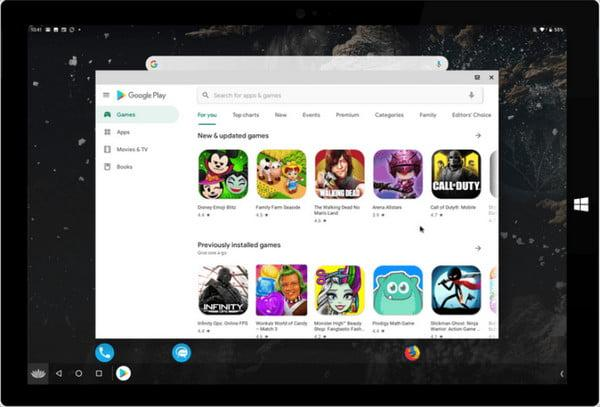
Android emulators provide a practical solution by allowing users to create a virtual Android environment on their computers. Instead of relying entirely on a smartphone, users can access compatible mobile applications through Windows or other supported desktop operating systems.
Although the concept sounds simple, choosing the right software requires some understanding of emulator features, hardware requirements, and application compatibility.
How Android Emulation Works
An Android emulator creates a software-based environment that behaves like an Android device. It reproduces important components of the operating system, allowing compatible applications to run on a computer.
When someone launches an emulator, the software loads its virtual Android environment. Users can then install applications, adjust settings, and interact with them through the computer.
Depending on the program, additional features may include keyboard mapping, mouse controls, screen recording, file sharing, and multiple virtual devices.
The technology is particularly useful for people who want to experience mobile applications without purchasing additional hardware.
Why Desktop Users Are Exploring Android Emulators
The popularity of emulators is connected to the flexibility they provide. Different users have different reasons for running Android software on their computers.
A More Comfortable Gaming Experience
Mobile gaming can be enjoyable, but touchscreen controls are not ideal for everyone. Some players prefer physical keyboards and mice because they offer familiar input methods.
Gaming emulators allow users to assign different actions to keyboard keys. This can make navigation, movement, and other in-game activities easier.
BlueStacks 5 is a well-known option that provides customizable controls, performance settings, and support for multiple application instances.
LDPlayer 9 also focuses on gaming and includes tools for adjusting controls and managing virtual device resources.
GameLoop is another specialized option associated with supported mobile games, including popular multiplayer titles.
However, players should remember that some games have specific emulator policies and compatibility requirements.
Managing Mobile Applications Alongside Desktop Software
People who work on computers throughout the day may prefer keeping essential mobile applications accessible without constantly switching devices.
For example, someone managing personal projects might use an Android-based task manager while working with spreadsheets and documents on a desktop.
Similarly, communication applications can remain available in a separate window while users complete other tasks.
MEmu Play and NoxPlayer offer features that can support these activities, including application installation, customizable controls, and virtual device management.
Learning and Exploring New Applications
Emulators can also provide an opportunity to explore Android software before deciding whether it is useful for everyday activities.
Students can experiment with educational applications, language-learning tools, and digital reading platforms.
Teachers may use compatible applications to demonstrate learning activities on larger displays. Content creators can also examine how mobile interfaces appear in a desktop environment.
The usefulness of these activities depends on the application’s compatibility with the selected emulator.
Popular Emulator Options Worth Exploring
Several programs provide Android emulation, but their features and intended audiences are not identical.
BlueStacks
BlueStacks is widely recognized for its gaming-oriented environment and accessible interface. It offers keyboard controls, multiple instances, and performance customization.
It can be suitable for users who want a relatively straightforward way to run supported Android applications on Windows computers.
LDPlayer
LDPlayer is another popular choice among mobile gaming enthusiasts. It offers customizable control configurations and performance settings.
Its different versions support particular Android environments, so checking compatibility before installation is recommended.
MEmu Play
MEmu Play provides tools for managing applications and multiple virtual Android instances. It can be useful for users who want to experiment with different applications or maintain separate environments.
NoxPlayer
NoxPlayer combines application compatibility with keyboard mapping and other customization features.
Its interface provides access to different controls and configuration settings, making it an option worth considering for general Android usage.
Android Studio Emulator
Unlike gaming-focused products, Android Studio’s emulator is primarily designed for developers.
It allows software engineers to create virtual Android devices with different configurations. Developers can use these environments to test application functionality, examine interface layouts, and identify compatibility issues.
What Computer Specifications Should You Consider?
An emulator does not operate independently of the computer’s hardware. It shares available resources with the operating system and other running applications.
Understanding the main hardware requirements can help users avoid unnecessary performance problems.
Memory and Processing Power
RAM influences how smoothly an emulator operates, particularly when several applications are open simultaneously.
A computer with 8 GB of RAM can provide a reasonable starting point for general use, while 16 GB offers additional flexibility for demanding applications and multitasking.
The processor is equally important. Modern multicore CPUs generally provide a better experience when handling virtual environments.
Users should also check whether hardware virtualization is supported and whether it needs to be enabled in BIOS or UEFI settings.
Storage and Graphics
An SSD can improve application loading times and general system responsiveness. Users should maintain enough free storage for emulator installations, Android system files, application downloads, and updates.
Graphics performance becomes especially important when running games with detailed environments and visual effects.
Updating GPU drivers and adjusting graphics settings can help improve compatibility and responsiveness.
Understanding Application Compatibility
One of the most important considerations is whether the required application will work properly in a virtual environment.
Some Android applications depend on specific operating system versions, hardware sensors, mobile services, or security features.
For this reason, an emulator that works well for gaming may not necessarily be suitable for every productivity application.
Before selecting software, users should identify their most important applications and check their compatibility requirements.
It is also useful to examine whether the emulator supports the required Android version and whether regular updates are available.
Finding the Right Android Emulator for Your Needs
Choosing software becomes easier when users understand their priorities. Gaming enthusiasts may focus on graphics performance and keyboard customization, while students may prefer a simple interface and reliable application support.
Anyone comparing available solutions can explore resources covering the أفضل محاكي أندرويد للكمبيوتر to understand different emulator options, their capabilities, and the factors that influence their performance.
Rather than selecting a program based entirely on popularity, consider its compatibility with your computer and the applications you intend to use. A lightweight solution may be more appropriate for an older laptop, whereas a gaming-focused emulator could be preferable for a modern desktop system.
Downloading and Installing Emulator Software Safely
Once a suitable program has been selected, the next step is finding a reliable installation source.
Users searching for أفضل محاكي أندرويد للكمبيوتر should pay attention to the available software information, supported operating systems, and installation requirements before downloading anything.
It is generally advisable to obtain installation packages directly from official developer websites. Unknown download sources may distribute outdated or modified software that introduces unnecessary security risks.
After installation, users should review the available settings, install applications from trusted sources, and keep the emulator updated.
Avoid granting unnecessary permissions and review the privacy practices of the software before using it regularly.
Tips for a Better Everyday Experience
A few practical adjustments can make desktop Android usage more convenient.
Start by configuring the display resolution according to your monitor and available graphics resources. Higher resolutions may improve visual clarity but can also increase hardware demands.
Next, customize keyboard controls if the emulator supports them. This is particularly helpful for games and applications that involve frequent interaction.
Keep background applications under control to ensure that the emulator has sufficient memory and processing resources.
Finally, avoid running multiple virtual Android instances unless they are genuinely necessary. Starting with one environment makes it easier to identify performance issues and adjust the configuration.
Conclusion
Android emulators provide a useful connection between mobile applications and desktop computing. They allow people to explore games, educational resources, productivity tools, and development environments without depending entirely on physical Android devices.
However, the best experience comes from selecting software that matches the computer’s capabilities and the user’s actual requirements.
By examining hardware specifications, application compatibility, security considerations, and available features, users can make informed decisions. With suitable software and sensible configuration, a desktop computer can become a flexible environment for accessing many aspects of the Android ecosystem.
