

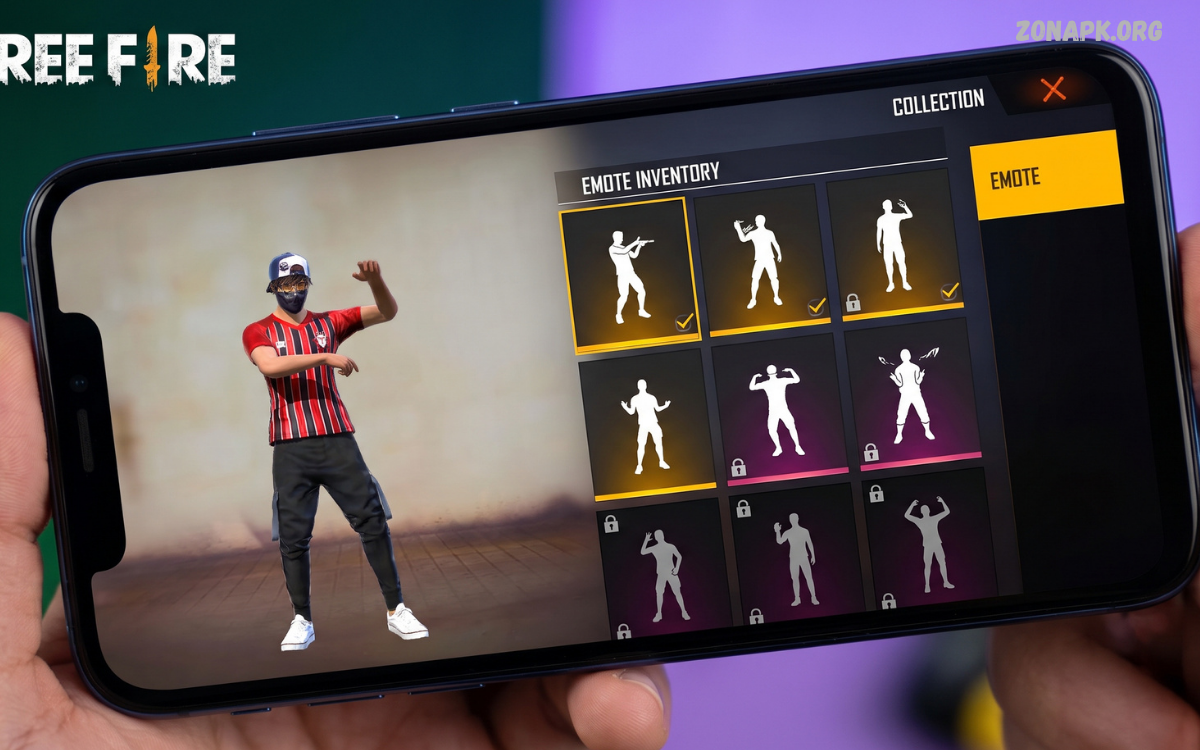
Free Fire emotes have become an important part of the game’s identity, allowing players to express reactions, celebrate victories, communicate with teammates, and add personality to matches. As players collect more animations through events, rewards, bundles, passes, and other legitimate in-game features, managing everything efficiently becomes increasingly useful. The Free Fire emote inventory provides a dedicated place where players can view, organize, equip, and manage available emotes according to personal preferences.
Understanding the Free Fire emote inventory can make customization much easier, especially for players who own several different animations. Instead of searching through a large collection before every match, players can organize their preferred emotes and place frequently used options in convenient slots.
What Is Free Fire Emote Inventory?
Free Fire emote inventory refers to the in-game collection where players can access emotes they have unlocked or obtained through legitimate gameplay features. An emote is an animated expression performed by a character, often involving a dance, gesture, celebration, greeting, or humorous movement.
The inventory becomes particularly useful when a player owns many emotes. Rather than treating every animation as equally important, players can select favorites and equip those they want available during gameplay.
Why Free Fire Emote Inventory Matters
Emotes do not normally determine a player’s shooting accuracy, movement speed, or weapon performance, but they contribute significantly to personalization. Free Fire has a strong cosmetic culture, and emotes are one of the easiest ways to make a character feel unique. A carefully selected collection can complement outfits, bundles, character appearances, and other cosmetic items.
Inventory management also saves time. Players who regularly switch between different emotes may find a large collection difficult to navigate. Keeping favorite animations organized allows faster selection during appropriate moments. Good organization becomes even more valuable for long-term players who have accumulated emotes across multiple events and promotional periods.
How to Access Free Fire Emote Inventory
Accessing the emote inventory generally involves opening Free Fire and entering the relevant customization or collection section. Interface names and locations can change between game updates, regional versions, and Free Fire editions, so players should rely on the current in-game menus rather than older tutorials that may show outdated layouts.
Once inside the relevant customization area, players can look for the emote section. Available emotes should appear as collectible animations, while equipped emotes are displayed in designated slots. Selecting an available animation usually provides options related to equipping or managing that emote.
Understanding Emote Slots
Emote slots allow players to decide which animations remain readily available during gameplay. Instead of carrying every collected emote into a match, players can select a smaller group that fits their preferences. Slot limitations can encourage players to think about which animations they use most frequently.
A practical setup usually includes a mixture of celebration, greeting, humorous, and reaction-based animations. Players who enjoy playing with friends may prioritize emotes that work well during squad interactions. Players who focus on personal expression may instead select animations that match their favorite character outfit or overall cosmetic theme.
How to Equip Emotes
Equipping an emote normally requires entering the emote management section, selecting an available animation, and assigning it to an open slot. The exact button names can vary depending on the current Free Fire interface, but the overall process remains straightforward.
After assigning an emote, players should check the equipped slots before starting a match. This quick check helps prevent accidentally entering gameplay with unwanted animations. Regularly reviewing the setup also makes it easier to replace older favorites with newly unlocked emotes.
How to Organize Free Fire Emote Inventory
Organization becomes increasingly important as an emote collection grows. One useful method involves placing the most frequently used animations into the easiest-to-access slots. Players can then reserve remaining slots for seasonal, event-based, funny, or rarely used emotes.
Another approach involves organizing emotes according to purpose. For example, one slot can contain a victory animation, another can hold a greeting, while additional slots can feature humorous reactions. This simple system creates a predictable arrangement and reduces confusion during matches.
Favorite Emotes vs. Complete Collection
Having a large collection does not mean every emote needs to be equipped. The complete collection can remain available inside the inventory while only the most useful or entertaining animations occupy active slots.
Players should consider personal usage rather than rarity alone. A common animation used regularly can provide more practical value than a rare emote that rarely fits the player’s preferred style. Inventory management should therefore focus on enjoyment, convenience, and personalization rather than simply displaying the most exclusive items.
How to Get New Free Fire Emotes
New emotes can become available through legitimate in-game events, rewards, passes, shops, promotional activities, and other official features. Availability changes over time, meaning an emote offered during one event may not remain available permanently.
Players should regularly check official Free Fire announcements and the in-game event section for current opportunities. Avoiding unofficial websites, modified applications, suspicious generators, and unauthorized account services is important because such sources can create security risks or violate game rules.
Free Fire Emote Events
Events are one of the major ways cosmetic content becomes available in Free Fire. Special events may introduce new animations, returning cosmetics, themed collections, or limited-time rewards. Event requirements can vary considerably, so players should carefully read the official event information before participating.
Limited-time events can also encourage players to review their inventory. When a new themed emote becomes available, players may want to compare it with existing animations before deciding whether it deserves an active slot. This keeps the inventory fresh without making it unnecessarily difficult to navigate.
Rare Emotes in Free Fire
Some emotes become highly recognizable because of their limited availability, age, event association, or popularity within the Free Fire community. Older animations may become particularly interesting to collectors who enjoy maintaining a diverse cosmetic inventory.
Rarity alone, however, does not automatically make an emote better. The most useful animation depends on individual preference. Some players prefer classic animations, while others prioritize newer designs introduced through current events.
Free Fire Emote Inventory for New Players
New players may initially have only a small number of emotes, making inventory management very simple. This is a good time to establish an organized system before the collection becomes larger.
New players should avoid focusing entirely on collecting every available cosmetic item. Instead, they can gradually build a collection based on legitimate rewards and personal preferences. Learning how the inventory works early makes future customization much easier.
Free Fire Emote Inventory for Long-Term Players
Experienced players often face the opposite situation: too many cosmetic items and not enough active slots. A long-term account can contain animations from different periods, events, collaborations, and seasonal campaigns.
For these players, periodic inventory cleanup can be useful. Reviewing the entire collection every few weeks or after major updates helps identify favorite animations, newly acquired items, and combinations that no longer fit the player’s current style.
Emote Inventory and Character Customization
Emotes can complement character customization. A player wearing a particular outfit may prefer animations with a similar theme or mood. Although there is no requirement to match emotes with outfits, creating a coordinated cosmetic setup can make the overall profile feel more personalized.
Players can experiment with different combinations to find a style they enjoy. A competitive-looking outfit might pair well with energetic victory animations, while a humorous character setup could use playful emotes. The choice is entirely cosmetic and depends on personal taste.
Using Emotes During Matches
Emotes can be used during suitable moments in a match, such as celebrating after a successful play or interacting with teammates. They can add entertainment to social gameplay and help players express reactions without typing messages.
Players should remember that emotes can sometimes distract from gameplay. During intense situations, maintaining awareness should remain more important than using an animation. Emotes work best when used at appropriate moments rather than continuously.
Emotes and Team Communication
Although emotes are not a replacement for voice communication or strategic signals, they can contribute to casual team interaction. A greeting can welcome teammates, while a celebration animation can mark an enjoyable moment.
Players should avoid assuming that every emote has a universal meaning. Different communities may interpret certain animations differently. Clear communication through the game’s supported communication features remains more reliable when precise information matters.
How to Keep Emote Inventory Organized
A simple inventory system can make a large collection easier to manage. Start by identifying the animations used most frequently. Place these into active slots, then use remaining slots for situational or newly acquired emotes.
Another useful habit involves reviewing the inventory after major events. New emotes can easily be forgotten when added to an established collection. Checking the inventory after receiving rewards ensures that new animations are considered for active use.
Common Free Fire Emote Inventory Mistakes
One common mistake is filling every available slot without considering actual usage. Players may equip animations simply because they own them, resulting in a collection that feels random and difficult to navigate.
Another mistake involves relying on unofficial methods to obtain unavailable emotes. Websites promising unlimited cosmetics, unauthorized account modifications, or suspicious rewards can put accounts and personal information at risk. Official game features remain the safer approach.
Can Emotes Improve Gameplay?
Emotes are primarily cosmetic and social features. They are not designed to provide a direct competitive advantage in standard gameplay. Better performance generally comes from practicing movement, aiming, positioning, game awareness, and understanding weapon mechanics.
Emotes can still improve the overall gaming experience by adding personality and entertainment. Players who enjoy customization may find collecting and organizing animations almost as enjoyable as other cosmetic aspects of Free Fire.
Free Fire Emote Inventory and Account Progress
As an account develops, its cosmetic collection can become a record of the player’s time with the game. Certain emotes may remind players of particular events, seasons, or periods when they actively played Free Fire.
This makes inventory management more than simple cosmetic organization for some players. A well-maintained collection can reflect personal preferences and memorable moments. Players can preserve favorite animations while continuing to experiment with newer additions.
Managing Seasonal Emotes
Seasonal emotes can be especially appealing because they often match specific celebrations, themes, or limited-time events. Once obtained, these animations can remain part of a player’s permanent collection depending on the game’s reward structure.
Keeping seasonal animations in a separate mental category makes inventory organization easier. Players can activate them during relevant events and return to their regular favorites afterward.
Choosing the Best Emotes
There is no universal list of the best Free Fire emotes because preferences differ between players. One player may prefer dance animations, while another may enjoy victory gestures or funny reactions.
A better approach involves evaluating each animation based on frequency of use, visual appeal, theme, and compatibility with the player’s preferred cosmetic style. This creates a collection that feels personally useful rather than simply popular.
Read Also: Free Fire Emote Menu: Complete Guide to Using, Changing, and Managing Emotes
Free Fire Emote Inventory Tips
One of the easiest tips is to keep your favorite animations in consistent slots. Once players become familiar with their layout, they can access preferred emotes without repeatedly searching through menus.
Another tip is to test newly acquired emotes before replacing established favorites. Spend some time using a new animation and decide whether it genuinely improves the active collection. This prevents constant changes and keeps the inventory organized.
How Updates Can Affect Emote Inventory
Free Fire regularly receives updates that can modify menus, events, cosmetic content, and other game features. As a result, instructions based on an older interface may not exactly match the current version.
Players should always check the latest version of the game when managing their inventory. If a menu appears different after an update, explore the current customization and collection sections rather than relying exclusively on outdated screenshots.
Free Fire Emote Inventory and Cosmetic Collecting
For many players, collecting cosmetics is an important part of the Free Fire experience. Emotes offer a relatively simple way to expand a collection because they provide visible animations without changing core combat mechanics.
Collectors may prioritize older, event-specific, or visually distinctive animations. Casual players may simply choose a handful of favorites. Both approaches are valid, and the inventory system supports different styles of cosmetic collecting.
Safe Ways to Manage Your Free Fire Account
Account security should remain a priority when managing any collection. Players should avoid sharing account passwords, authentication information, or other private credentials with websites or individuals promising free emotes.
Legitimate rewards should come through official Free Fire systems and recognized promotional channels. Suspicious offers that request login information or promise unlimited premium items should be treated cautiously.
Avoid Fake Free Emote Generators
Search results sometimes contain websites claiming to generate free emotes, diamonds, skins, or other premium items. These services can be misleading and may attempt to collect account information or direct users toward unsafe downloads.
Players should never provide sensitive account credentials to an unofficial generator. Free Fire cosmetics should be obtained through legitimate game features, official events, and authorized promotions.
Free Fire Emote Inventory on Different Devices
The inventory experience can vary slightly depending on device type, screen size, operating system, game edition, and current interface version. However, the fundamental concept remains similar: players access their cosmetic collection and select available emotes for use.
If an emote appears missing, players should first verify that they are using the correct account and current game version. Checking the relevant collection section can also help determine whether an item is equipped, stored, event-limited, or no longer available.
Improving Your Emote Collection
Building an enjoyable emote collection does not require obtaining every animation. Instead, focus on quality and personal preference. Choose animations that fit your favorite outfits, characters, gameplay personality, or social interactions.
Keeping a smaller active selection can actually make the collection more enjoyable. Players can still own many emotes while maintaining only a few favorites in active slots. This provides variety without creating unnecessary clutter.
Frequently Asked Questions
What Is Free Fire Emote Inventory?
Free Fire emote inventory is the section used to manage collected emotes. It allows players to view available animations and select which ones they want to equip for use during gameplay.
How Do I Equip an Emote?
Open the relevant customization or emote section, select an available animation, and assign it to an open emote slot. Menu names can change with updates, so follow the current in-game interface.
Can I Use All My Emotes at Once?
Active emote slots are limited, so players generally need to select specific animations for quick access. Other collected emotes remain part of the broader collection.
How Can I Get New Emotes?
New emotes can become available through official events, rewards, passes, shops, and promotional activities. Availability varies over time.
Are Free Fire Emotes Useful for Winning Matches?
Emotes are primarily cosmetic and social features. They do not normally provide a direct combat advantage. Gameplay performance depends more on skill, strategy, positioning, movement, and practice.
Why Is My Emote Missing?
Check whether the correct account is being used, verify the current game version, and inspect the relevant collection section. Some content may also be event-specific or subject to availability changes.
Should I Equip Rare Emotes?
Rare emotes can be valuable to collectors, but rarity does not mean an animation must be equipped. Choose animations based on personal preference and frequency of use.
Can I Get Emotes From Unofficial Websites?
Players should avoid unofficial websites offering unauthorized cosmetics or generators. Such services can create account-security risks and may violate game rules. Use official Free Fire systems instead.
Conclusion
The Free Fire emote inventory provides an easy way to manage one of the game’s most recognizable cosmetic features. Whether you have only a few animations or a large collection built over several events, organizing active slots can make your experience smoother and more enjoyable. Selecting frequently used emotes, testing new additions, and reviewing your collection regularly are simple ways to maintain an effective setup.
Most importantly, players should focus on legitimate ways to obtain and manage cosmetics. Official events, in-game rewards, and authorized promotions provide safer options than suspicious generators or unauthorized services. With a well-organized Free Fire emote inventory, players can keep favorite animations ready for matches while continuing to build a collection that reflects their individual style.

1 Comment
Pingback: Free Fire Emote Wheel: Complete Guide to Emotes, Customization, Controls & Usage - Zonapk