

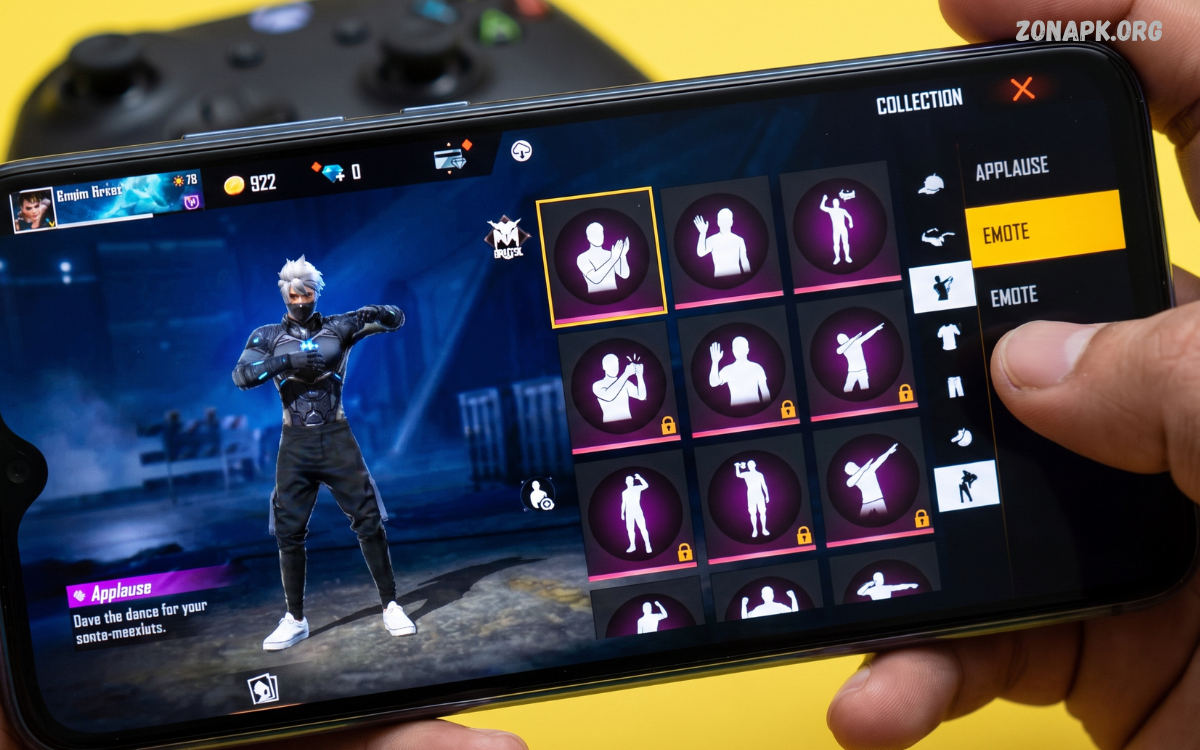
The Free Fire emote menu is one of the most entertaining features in Garena Free Fire. Emotes allow players to express reactions, celebrate victories, communicate with teammates, and add personality to matches without typing messages. From simple greetings to impressive victory animations, the emote system gives players a quick way to communicate while keeping gameplay visually engaging.
Understanding the Free Fire emote menu can make it easier to organize favorite emotes and use them at the right moment. Whether you are a new player learning the interface or an experienced player looking for a faster way to switch emotes, knowing how the menu works can improve your overall in-game experience.
What Is the Free Fire Emote Menu?
The Free Fire emote menu is the in-game interface that lets players access and use equipped emotes. Instead of opening a separate collection every time you want to perform an emote, the menu provides quick access to the animations assigned to your character. Players can normally open the emote wheel during a match and select an available emote.
The menu is designed for quick interaction. Once emotes are equipped, players can select one from the available positions and activate it with a simple tap. The exact interface can vary depending on the Free Fire version, device, control layout, and game updates, but the basic purpose remains the same: provide fast access to selected emotes.
Why Is the Free Fire Emote Menu Important?
Emotes are more than cosmetic animations for many Free Fire players. They provide a visual communication method that can be useful when voice chat or text chat is inconvenient. A player can use an emote to greet a teammate, celebrate a successful play, signal confidence, or simply add entertainment to a match.
The menu also helps players keep their favorite animations ready for use. Free Fire includes a large collection of cosmetic items and emotes, so having a quick-access system prevents players from searching through the entire collection during a match. Properly organizing the menu can make emote selection faster and more convenient.
How to Open the Free Fire Emote Menu
Opening the Free Fire emote menu generally involves using the emote button displayed on the in-game interface. On touchscreen devices, this button can normally be tapped during gameplay. After opening the wheel or selection interface, available emotes appear around the character or within the designated menu area.
Players should become familiar with the location of the emote button before entering an intense match. Knowing where the control is located reduces unnecessary movement through the interface. Depending on the current control configuration, players may also be able to adjust the position of interface elements through the game’s settings.
How to Equip Emotes in Free Fire
Before an emote can appear in the quick-access menu, it usually needs to be equipped through the game’s customization or collection interface. Players can enter the emote section, review available animations, and assign selected emotes to available slots. This creates a personalized selection that can be accessed during gameplay.
A useful approach is to place frequently used emotes in the easiest positions to reach. Players who regularly use only a few favorite animations can prioritize those selections instead of filling every available slot with random choices. This keeps the menu organized and makes the interface easier to understand during a fast-paced match.
How to Change Emotes in the Menu
Changing emotes is useful when players want to replace an old animation with a newly unlocked one. The process generally involves opening the character customization or emote collection section, selecting an available emote, and assigning it to an existing slot. The previous emote can then be replaced by the new selection.
Players can experiment with different combinations to create a menu that matches their preferences. Some players may prefer celebratory animations, while others may choose funny, friendly, or expressive emotes. Regularly updating the menu also gives players an opportunity to use newly acquired cosmetic content.
How Many Emotes Can You Use?
The number of emotes available for quick access can depend on the current Free Fire version, game mode, character setup, and interface configuration. Garena has changed features and layouts over time, so players should rely on the options displayed inside their current game rather than older screenshots or outdated guides.
The larger emote collection can contain many animations, but players normally need to select a smaller group for convenient in-match access. This distinction is important because owning an emote does not necessarily mean it will automatically appear in the active emote menu.
Free Fire Emote Menu and the Emote Collection
The emote collection contains the animations a player has unlocked or obtained. The Free Fire emote menu, meanwhile, functions as a quick-access selection for gameplay. Understanding this difference makes it easier to manage cosmetic items without confusing the complete collection with the active menu.
Players can own numerous emotes while keeping only selected favorites in their quick-access configuration. This setup is useful because it allows players to maintain a large collection without making the in-game menu difficult to navigate. Organizing favorite animations is especially helpful for players who frequently participate in matches.
How to Use an Emote During a Match
Using an emote generally requires opening the emote menu and selecting the desired animation. Once selected, the character performs the corresponding animation. Players should remember that emotes are primarily cosmetic and do not normally provide combat advantages.
Timing can make emotes more enjoyable. Players may use them after completing a successful play, when interacting with teammates in a safe area, or after a match. Using an emote during an active fight can distract from gameplay, so it is better to prioritize the match whenever immediate action is required.
Free Fire Emote Menu for New Players
New players can find the emote system confusing because Free Fire contains many customization options. The easiest way to learn the menu is to start with a small selection of favorite emotes and practice accessing them in non-critical situations. This helps build familiarity with the interface.
New players should also avoid assuming that every emote seen in a match is permanently available to every account. Some animations may be connected to particular events, collections, rewards, or availability periods. The emote inventory shown on an individual account determines which animations can actually be equipped.
Best Way to Organize the Free Fire Emote Menu
A well-organized menu can make emotes easier to access. One practical strategy is to place the most frequently used animation in the easiest-to-reach slot. Other positions can contain different categories, such as celebration, greeting, funny, or reaction-based emotes.
Another useful strategy is to remove rarely used animations from the quick-access section. Keeping too many unwanted selections can make it harder to find the animation you actually want. A simple and organized menu is often more convenient than a crowded configuration.
Free Fire Emote Menu for Quick Communication
Free Fire matches can move quickly, making communication important. Although emotes cannot replace detailed team communication, they can provide simple visual reactions. A player might use an appropriate emote to acknowledge a teammate, celebrate a successful moment, or interact with friends.
Players should remember that emotes are not reliable tactical signals unless everyone on the team understands the intended meaning. For important information, standard communication tools, pings, or voice communication are generally more effective. Emotes are best treated as an additional social feature.
Emotes and Team Interaction
Emotes can make team sessions more entertaining. Squad members can use different animations when gathering before a match or celebrating after a successful round. This social element is one reason emotes remain popular among Free Fire players.
Using emotes respectfully also improves the multiplayer experience. Some players enjoy playful interactions, while others prefer to focus entirely on gameplay. Choosing appropriate moments helps keep emote usage fun without disrupting teammates or opponents.
Free Fire Emote Menu After a Game Update
Free Fire receives updates that can change interface layouts, features, events, and customization options. Because of this, the location or appearance of the emote menu can sometimes change. Players following an older tutorial may notice differences between the instructions and their current game.
When an update changes the interface, the safest approach is to explore the current customization and settings sections. Players should also check official in-game announcements for feature changes. Avoid relying entirely on old screenshots because menu designs can become outdated quickly.
Common Free Fire Emote Menu Problems
Some players may experience difficulty locating an equipped emote, opening the menu, or changing their selections. These issues can sometimes result from interface changes, incorrect equipment settings, temporary game problems, or differences between game versions.
If an emote does not appear as expected, players can first check whether it is actually equipped. They can then review the relevant customization settings and restart the game if necessary. Keeping the game updated can also help ensure access to the latest interface and feature improvements.
Why an Equipped Emote May Not Appear
One common reason an emote does not appear in the quick menu is that the player owns the emote but has not assigned it to an active slot. The collection and active menu serve different purposes, so simply possessing an animation does not always place it in the quick-access area.
Another possibility is that the current character, mode, or interface has different configuration options. Players should inspect their active loadout and emote slots carefully. If the problem continues after checking the configuration, restarting the game can sometimes resolve temporary interface issues.
Free Fire Emote Menu and Customization
Customization is a major part of Free Fire’s appeal. Players can personalize their characters with outfits, skins, accessories, and emotes. The emote menu adds another layer of personalization by allowing players to choose which animations are immediately available.
A personalized menu can also reflect a player’s style. Some users prefer humorous animations, while others prefer stylish victory celebrations. There is no single best emote configuration because the ideal setup depends on individual preferences and how often each animation is used.
Can Emotes Improve Gameplay?
Emotes do not generally improve core combat abilities. They are primarily cosmetic features designed for expression and entertainment. Having a rare or impressive emote does not automatically make a player better at aiming, movement, positioning, or decision-making.
However, becoming comfortable with the menu can improve convenience. Players who know exactly where their preferred emotes are located can use them without wasting time navigating menus. The benefit is therefore related to interface familiarity rather than combat performance.
Free Fire Emote Menu Tips for Mobile Players
Mobile players should pay attention to button placement. If the emote button is difficult to reach, adjusting the control layout can make interaction more comfortable. The goal should be to maintain convenient access without interfering with essential movement, aiming, firing, or other controls.
Players can also spend a little time practicing the interface before competitive matches. Familiarity reduces accidental taps and makes it easier to return to normal gameplay after using an emote. A comfortable HUD layout can be particularly helpful for players who frequently switch between different control configurations.
Read Also: Free Fire Emote Section: Complete Guide to Emotes, Features, and Customization
Avoid Misleading Free Fire Emote Claims
Players searching for emotes may encounter websites, videos, or social posts claiming that special codes, modified applications, or unofficial tools can unlock every emote instantly. Such claims should be treated carefully, especially when they request account credentials, downloads from unknown sources, or unusual permissions.
The safest approach is to use legitimate in-game features and official Free Fire promotions. Players should never share passwords, verification codes, or account credentials with websites claiming to unlock cosmetic items. Protecting an account is more important than obtaining a particular emote.
Free Fire Emote Menu and Events
Free Fire frequently uses events and promotional activities to introduce cosmetic content. Depending on the event, players may encounter new emotes, themed rewards, or opportunities to obtain cosmetic items. Availability can differ by region, account, event period, and game version.
Players interested in new emotes should monitor official announcements and the event section inside the game. Event-based content can have specific requirements or availability periods, so checking the current information is more reliable than following old event guides.
How to Choose the Best Emotes
There is no universal list of the best emotes because preferences vary widely. A useful selection should contain animations that the player actually enjoys and expects to use. Popularity can be interesting, but an emote does not become better simply because many players use it.
Players can consider several factors when choosing their quick-access animations. Ease of recognition, personal preference, animation style, and frequency of use are more practical considerations than rarity alone. A simple favorite emote can be more valuable to a player than a rare animation that never gets used.
Free Fire Emote Menu for Casual Players
Casual players can keep the menu simple. Selecting a few favorite emotes is usually enough for social interactions and celebrations. There is no need to constantly change the configuration unless a player enjoys experimenting with different cosmetic combinations.
A simple menu can also make the game easier for beginners. Instead of spending excessive time managing cosmetic options, players can focus on learning movement, map awareness, weapon handling, and teamwork. Emotes can remain an enjoyable customization feature without becoming a distraction.
Free Fire Emote Menu for Experienced Players
Experienced players may want a more carefully arranged menu. They can assign frequently used animations to preferred positions and change the configuration based on new additions to their collection. Players who regularly participate in social or custom matches may use emotes more frequently than players focused on competitive gameplay.
Experienced users can also become familiar with the exact location of each selected animation. This familiarity makes the menu almost automatic to use. The more consistently a player uses the same layout, the less time is required to find a particular emote.
Difference Between Emotes and Other Cosmetic Items
Emotes are animated expressions or actions performed by a character. Other cosmetic items, such as outfits, weapon skins, bundles, and accessories, change the visual appearance of characters or equipment. Each category has a different purpose within the customization system.
The Free Fire emote menu specifically focuses on quick access to animations. Understanding this distinction makes it easier to navigate the game’s collection. Players can manage outfits and other cosmetics separately while maintaining a dedicated selection of favorite emotes.
Free Fire Emote Menu and Account Progress
Emote collections can change as an account progresses. Players may receive or obtain new cosmetic items through legitimate game features, events, promotions, or other available systems. As the collection grows, the active menu may need occasional organization.
Instead of keeping every new animation in the quick-access area, players can review their collection periodically. Removing animations that are no longer interesting keeps the menu useful. This approach also makes newly acquired favorites easier to access.
How to Keep the Emote Menu Organized
Organization does not require a complicated system. Players can begin by identifying their most frequently used emotes and assigning those first. Remaining positions can be used for occasional favorites or new animations that the player wants to test.
After several matches, players can evaluate whether the arrangement feels convenient. If a particular emote is rarely used, replacing it with another option can improve the setup. Small adjustments over time can create a menu that feels natural and efficient.
Frequently Asked Questions
What is the Free Fire emote menu?
The Free Fire emote menu is the quick-access interface used to activate equipped character emotes during gameplay. It allows players to select animations without searching through their entire cosmetic collection.
How do I change an emote?
Open the relevant emote or customization section, select the desired animation, and assign it to an available active slot. The exact steps and interface can vary between versions and devices.
Why can’t I see my emote?
Check whether the emote is actually equipped in an active slot rather than simply owned in the collection. If the configuration appears correct, restarting the game and checking for updates may help resolve temporary interface problems.
Can emotes give players an advantage?
Emotes are primarily cosmetic and do not normally increase combat abilities. They are designed for expression, entertainment, and social interaction.
Can I use all my emotes at once?
Players can own many emotes, but only the selections assigned to available quick-access slots can normally be used directly through the active menu. The number of available slots can depend on the current game configuration.
Are Free Fire emotes permanent?
The availability of an emote depends on how it was obtained and the conditions associated with it. Players should check their current collection and the relevant event or reward information for specific items.
Conclusion
The Free Fire emote menu is a simple but useful customization feature that adds personality and social interaction to matches. By learning how to equip, organize, change, and activate emotes, players can make better use of the cosmetic options available in their accounts. A well-arranged menu also makes favorite animations easier to access during appropriate moments.
For the best experience, players should keep their emote selection organized, learn the current interface after major updates, and use legitimate in-game methods for obtaining cosmetic content. Emotes cannot replace gameplay skills, but they can make matches more expressive and enjoyable.

1 Comment
Pingback: Free Fire Emote Inventory: Complete Guide to Managing and Using Emotes - Zonapk