

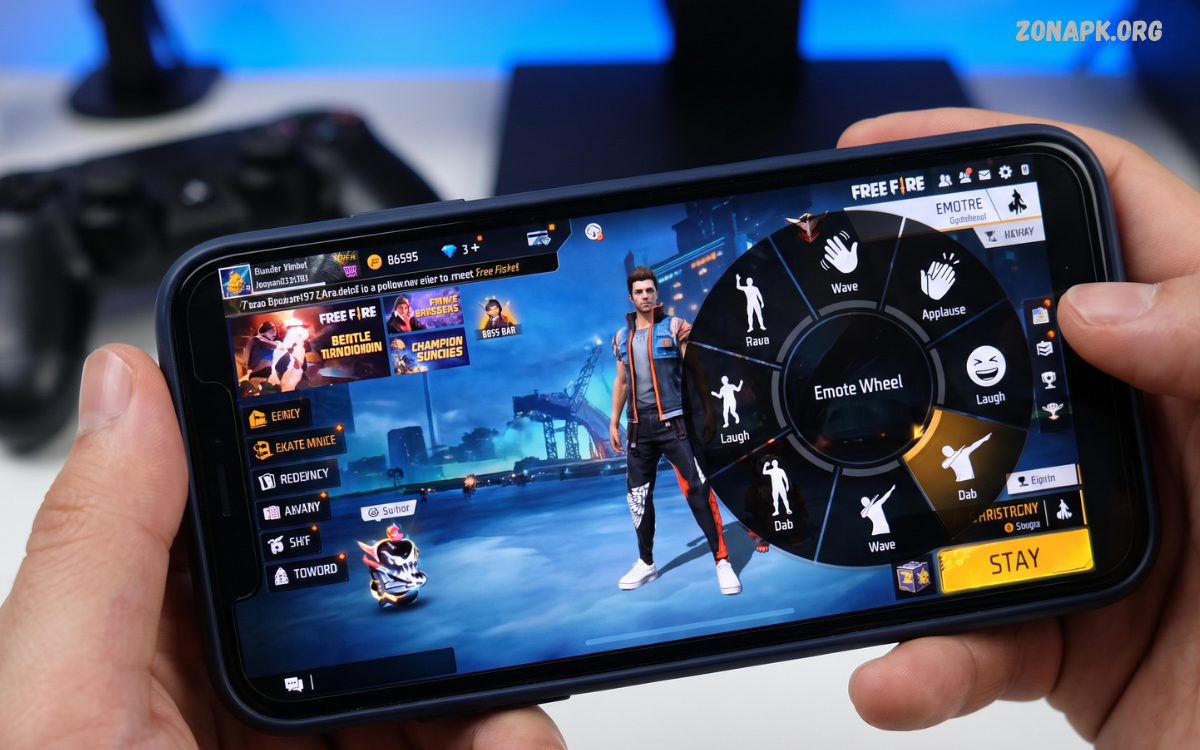
The Free Fire emote wheel gives players a quick way to use emotes during matches without opening menus or interrupting gameplay. Emotes have become an important part of Free Fire culture because they allow players to express reactions, celebrate victories, communicate with teammates, and personalize their presence on the battlefield.
Understanding the Free Fire emote wheel can make emote management easier, especially for players who regularly collect new animations through events, rewards, passes, and other legitimate in-game features. A properly organized wheel keeps favorite emotes easy to access and helps players avoid wasting time during matches.
What Is the Free Fire Emote Wheel?
The Free Fire emote wheel is an in-game interface designed for quick emote selection. Rather than opening a separate inventory page whenever an emote is needed, players can access the wheel during gameplay and choose an assigned animation. Each available position can represent a different emote, allowing players to create a personalized selection based on their favorite animations and gameplay habits.
The wheel works as a shortcut between the player’s emote collection and the active match. Once preferred emotes are assigned, selecting one generally requires only a quick interaction with the corresponding control. This makes the system especially convenient during social moments, celebrations, team interactions, and situations where players want to react without navigating through multiple menus.
Why the Free Fire Emote Wheel Matters
Emotes are more than simple animations in Free Fire. They have become part of the game’s social experience, giving players a visual method of expressing excitement, celebration, humor, confidence, or friendly interaction. A well-organized Free Fire emote wheel makes these expressions easier to access and reduces the amount of time required to find a particular animation.
Another advantage comes from personalization. Players can select emotes that match their preferred style rather than relying on a random or inconvenient arrangement. Competitive players may prefer a small collection of familiar emotes, while collectors may regularly rotate their wheel to showcase newly obtained animations. The best setup depends on individual preferences, device controls, and how frequently emotes are used.
How the Free Fire Emote Wheel Works
The basic concept behind the Free Fire emote wheel is simple: selected emotes are assigned to accessible positions around a central interface. Opening the wheel displays the available choices, and the player can select the desired animation using the appropriate touch or control input. The exact appearance and controls can vary depending on the game version, device, interface configuration, and updates.
Players should become familiar with the location of their most-used emotes. Memorizing positions can make selection faster because there is less need to visually search the wheel during a match. This becomes particularly useful for players who frequently use the same few animations and want consistent access across different matches.
How to Customize the Free Fire Emote Wheel
Customizing the Free Fire emote wheel usually starts from the game’s customization or emote management area. Players can review their available emotes and assign selected animations to available slots. The exact menu names and interface arrangement may change after game updates, so players should follow the current options displayed inside their own Free Fire installation rather than relying on outdated screenshots or instructions.
A practical approach involves placing frequently used emotes in the easiest positions to remember. Players can keep celebration emotes together, social emotes in another section, and less frequently used animations in remaining slots. Regularly reviewing the wheel also helps remove animations that are no longer interesting and replace them with newly unlocked options.
Choosing the Best Emotes for Your Wheel
Selecting the best emotes is largely a matter of personal preference. Some players prefer victory animations, while others enjoy funny, expressive, seasonal, or character-themed options. Instead of filling every slot with similar animations, creating a balanced collection can make the Free Fire emote wheel more useful in different situations.
A useful setup can include one or two celebration emotes, a friendly greeting, a humorous animation, a reaction-style emote, and a favorite signature emote. Players who participate heavily in team matches may also prioritize animations that work well during friendly interactions. The goal is not to create a universally perfect wheel but to build a layout that feels natural and easy to remember.
Free Fire Emote Wheel for New Players
New players may initially find the number of available emotes confusing. Free Fire can offer a wide variety of cosmetic animations, and beginners may not immediately know which ones deserve a place in the active wheel. Starting with a small group of favorite animations makes the system easier to understand and prevents unnecessary menu management.
Beginners should focus on learning the wheel’s controls before collecting a large number of emotes. Once the basic interaction becomes familiar, players can experiment with different layouts and replace older selections. This gradual approach creates a smoother experience and allows players to understand which emotes they actually use during real matches.
Free Fire Emote Wheel on Mobile Devices
Most Free Fire players experience the game through mobile devices, making touch controls an important part of emote management. Screen size, sensitivity, button placement, and personal control layouts can affect how easily a player interacts with the Free Fire emote wheel. A layout that feels comfortable on one device may feel different on another.
Players should avoid placing important controls in locations that make accidental taps more likely. A comfortable HUD can make wheel interaction smoother, especially during fast-paced matches. Testing the arrangement in a low-pressure environment can help players become comfortable with the controls before using the setup during serious gameplay.
Emote Wheel and Gameplay
The Free Fire emote wheel is primarily a cosmetic and communication feature rather than a gameplay advantage. Emotes do not replace core skills such as movement, aiming, positioning, awareness, and teamwork. However, quick access to emotes can make social interactions more convenient and enjoyable.
Players should also remember that using an emote during an active fight can distract from gameplay. Emotes are best treated as optional expressions rather than something that should interfere with movement or combat decisions. Keeping the wheel accessible while maintaining focus on the match creates a better balance between customization and gameplay.
Organizing Emotes Efficiently
Good organization is one of the simplest ways to improve the Free Fire emote wheel experience. Players can think of the wheel as a personal shortcut menu and assign positions according to frequency of use. Frequently selected animations should receive priority, while rarely used options can be placed in less important positions.
Another useful strategy involves periodically reviewing the wheel after obtaining new emotes. A newly unlocked animation may become a favorite, while an older selection may no longer be interesting. Updating the arrangement every few weeks keeps the wheel relevant and prevents it from becoming cluttered with animations that are rarely activated.
Free Fire Emote Wheel and Events
Free Fire regularly introduces limited-time content, themed events, and cosmetic rewards. Emotes can sometimes become part of these promotional activities or reward systems. When a new animation becomes available through an official event, players can add it to their collection according to the conditions provided by the game.
Event-related emotes can become popular because they may represent a particular theme or period within the game. Players who enjoy collecting cosmetics should check official event information and the in-game event interface for accurate availability details. Avoiding unofficial websites, modified clients, or suspicious reward offers is important because cosmetic content should be obtained through legitimate game features.
How to Quickly Find a Favorite Emote
The easiest way to find a favorite emote is to assign it to a consistent wheel position. Constantly changing positions can make muscle memory less useful and may cause players to select the wrong animation. Keeping frequently used options in familiar locations creates a predictable interaction pattern.
Players can also reduce visual searching by limiting the active wheel to genuinely useful favorites. Having dozens of collected emotes does not mean every animation needs to remain in the primary selection. A smaller, carefully selected wheel can be easier to use than a collection filled with animations that rarely receive attention.
Free Fire Emote Wheel and Team Communication
Although emotes do not replace voice or text communication, they can support simple social interactions between teammates. A greeting, celebration, or acknowledgment can make team interactions more engaging without requiring additional typing. This is particularly useful when players want to celebrate a successful moment quickly.
Players should still use appropriate communication methods when important information needs to be shared. An emote cannot reliably communicate detailed tactical information, enemy locations, rotations, or strategic decisions. The Free Fire emote wheel works best as a supplementary social feature rather than a replacement for meaningful team communication.
Emote Wheel During Matches
Timing matters when using emotes. A player may want to celebrate after completing an objective, interacting with teammates, or reaching a memorable moment. However, activating an animation at the wrong time can reduce awareness and create unnecessary distraction.
A good habit is to use the Free Fire emote wheel during safe moments rather than immediately before or during an important combat situation. Players can quickly access the wheel when there is enough space to interact with the interface and then return attention to the match. This keeps emotes enjoyable without allowing them to interfere with essential gameplay.
Common Free Fire Emote Wheel Problems
Sometimes players may experience issues where an emote does not appear in the expected position or where the interface behaves differently after an update. Game updates can modify menus, controls, cosmetic systems, and other interface elements. When this happens, checking the current in-game settings is usually the best starting point.
Another common issue involves accidentally changing an assigned emote. Players who frequently adjust their collection may unintentionally replace a favorite selection. Reviewing the wheel after customization can prevent this problem. If an issue appears to be caused by a technical error rather than normal interface changes, players should use official support channels and provide accurate information about their game version and device.
Why Emotes May Disappear From the Wheel
An emote may appear to disappear when its assignment has changed, the interface has been updated, or the player is viewing a different customization section. This does not necessarily mean the item has been permanently removed from the account. Checking the complete emote collection can help determine whether the animation is still available.
Players should avoid downloading unofficial files that claim to restore missing emotes. Modified applications and suspicious tools can create account-security risks and may violate game rules. The safest approach is to use the official game client and available account features when managing cosmetic content.
Free Fire Emote Wheel and Game Updates
Free Fire receives updates that can introduce new content and modify existing systems. As a result, instructions describing the Free Fire emote wheel may become outdated over time. Button locations, menu names, slot arrangements, and customization options can change as the game’s interface evolves.
For the most accurate experience, players should always compare guides with the current game version. If a menu appears different from an older tutorial, the in-game interface should take priority. This is especially important when following instructions that were created for previous versions of Free Fire or Free Fire MAX.
Building a Stylish Emote Collection
A stylish collection does not require every available emote. Instead, players can focus on animations that fit their preferred theme. Some may prefer energetic victory animations, while others may enjoy humorous or relaxed expressions. A consistent collection can make the Free Fire emote wheel feel more personalized.
Players can also rotate selections based on events, seasons, or personal preferences. Keeping a few permanent favorites while experimenting with newer options provides a balance between consistency and variety. This approach allows players to enjoy their collection without constantly rebuilding the entire wheel.
Read Also: Free Fire Emote Inventory: Complete Guide to Managing and Using Emotes
Free Fire Emote Wheel Tips
One of the most useful tips is to memorize the position of frequently used emotes. Familiarity makes activation faster and reduces the chance of choosing the wrong option. Another helpful practice is keeping the most important selections in easily remembered positions rather than randomly changing the layout after every new emote.
Players should also avoid treating the emote wheel as a competitive advantage. Emotes are designed primarily for expression and customization. Good movement, aiming, positioning, communication, and game awareness remain much more important for match performance. Using emotes responsibly keeps them entertaining without distracting from the main objective.
How to Improve Your Emote Wheel Setup
Improving the Free Fire emote wheel starts with identifying the animations that are actually used. Players can remove rarely selected options from the primary wheel and replace them with favorites. This creates a cleaner layout and makes every available position more useful.
After changing the wheel, players should spend some time becoming familiar with the new arrangement. Repeated use naturally improves recognition and reduces hesitation. If a particular position feels inconvenient, moving that emote to another slot can create a more comfortable setup without affecting the rest of the collection.
Free Fire Emote Wheel for Different Play Styles
Different players have different reasons for using emotes. Casual players may prioritize funny animations and social interactions, while collectors may want to display rare or seasonal cosmetics. Players who frequently participate in squads may prefer greetings, celebrations, and friendly reactions that support team interactions.
There is no single setup that works perfectly for everyone. The best Free Fire emote wheel is the one that matches a player’s habits. Instead of copying another player’s arrangement exactly, players should experiment with different positions and keep the layout that feels fastest and most comfortable.
Free Fire Emote Wheel and Personalization
Customization is one of the strongest reasons players enjoy cosmetic systems in Free Fire. Character outfits, weapon skins, bundles, profile elements, and emotes can all contribute to a player’s preferred style. The Free Fire emote wheel provides a convenient way to showcase selected animations during matches.
Personalization can also change over time. A player might prefer one type of emote today and another after discovering new content. There is nothing wrong with regularly updating the wheel. In fact, occasional changes can keep the game’s social features fresh and enjoyable.
Safe Ways to Get Free Fire Emotes
Players should obtain emotes only through legitimate methods provided by the game. Official events, rewards, promotions, and in-game systems may provide different opportunities depending on availability. Requirements can change, so players should read the current information shown inside the game.
Avoid websites or applications promising unlimited emotes, hacked accounts, modified game files, or unauthorized unlocks. Such offers can be misleading and may expose accounts or devices to security risks. Legitimate cosmetic content should always come from trusted, official sources.
Can the Free Fire Emote Wheel Improve Your Game?
The Free Fire emote wheel can improve convenience and the overall social experience, but it should not be considered a direct gameplay skill booster. It makes emote selection faster, but success in matches depends on broader abilities such as decision-making, positioning, movement, accuracy, awareness, and teamwork.
Its real value comes from making cosmetic interactions easier. Players can celebrate achievements, communicate simple reactions, and express personality without navigating complicated menus. When used at appropriate moments, the wheel adds another layer of customization to the Free Fire experience.
Frequently Asked Questions
What is the Free Fire emote wheel?
The Free Fire emote wheel is a quick-access interface that lets players select assigned emotes during gameplay. Instead of searching through the entire collection, players can use the wheel to reach their preferred animations more efficiently.
How do I change emotes on the wheel?
Open the relevant emote customization area in the current Free Fire interface, review the available animations, and assign preferred emotes to available positions. Menu names and layouts can change between game versions, so use the options shown in the current installation.
How many emotes can I use?
The number of emotes that can be actively assigned depends on the current game interface and available slots. Free Fire can change cosmetic systems through updates, so players should check the current emote management screen for the exact configuration.
Can I rearrange my emotes?
Yes, the purpose of customization is to allow players to manage their preferred emote selection. Rearranging positions can make frequently used animations easier to remember and access.
Why is my emote not showing?
Check whether the emote remains in your collection and whether its wheel assignment has changed. Updates can also modify the interface. If the animation remains unavailable despite being owned, consult official game support for the current version.
Are emotes useful in competitive matches?
Emotes are mainly cosmetic and social features. They do not replace important gameplay skills. Players should use them during appropriate moments and avoid allowing animations to distract from movement, awareness, or combat.
Can I get Free Fire emotes from unofficial websites?
Players should avoid unofficial downloads, modified clients, hacks, and suspicious reward websites. Legitimate emotes should be obtained through official game systems and promotions.
Conclusion
The Free Fire emote wheel is a simple but useful customization feature that makes favorite animations easier to access during matches. By organizing frequently used emotes, learning their positions, and maintaining a comfortable control layout, players can create a wheel that fits their individual preferences. A well-planned selection also makes social interactions, celebrations, and personal expression more convenient.
The best approach is to keep the system simple, update the wheel when preferences change, and use legitimate methods to obtain cosmetic content. Emotes are designed to add personality and entertainment to Free Fire, while core gameplay skills remain the foundation of successful matches.

1 Comment
Pingback: Free Fire Emote Slot: Complete Guide to Managing and Using Emotes- Zonapk