

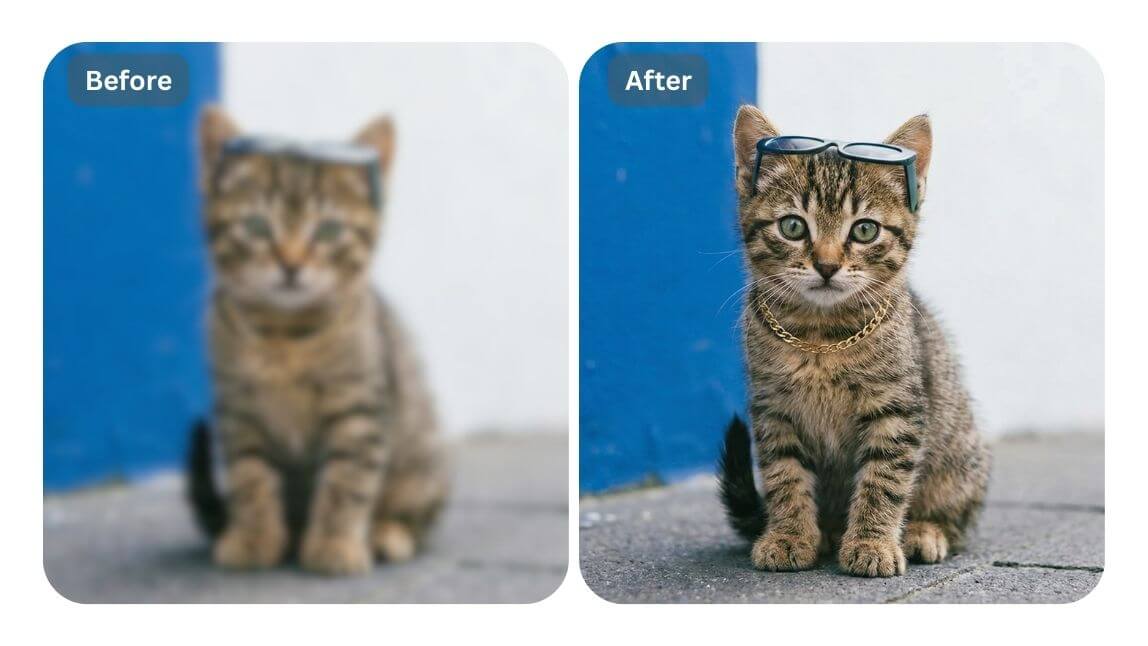
Image Enhancement Apps help users improve photo quality, adjust colors, sharpen details, and create attractive pictures. These applications offer simple editing tools for beginners and advanced features for experienced photographers.
Modern Image Enhancement Apps use artificial intelligence, automatic corrections, and professional editing controls. Users can transform ordinary photographs into clearer, brighter, and more visually appealing images without complicated software.
What Are Image Enhancement Apps?
Image Enhancement Apps are mobile applications designed to improve digital photographs through different editing techniques. These tools help correct brightness, contrast, sharpness, exposure, saturation, and other visual elements.
Many applications also include AI-powered features that automatically analyze images and suggest improvements. Users can enhance portraits, landscapes, product photographs, social media pictures, and everyday memories.
Why Image Enhancement Apps Are Important
Photo quality plays an important role in digital communication, social media, marketing, and personal photography. Clear, attractive images present information professionally and make visual content more engaging.
Image Enhancement Apps make professional-style editing accessible through smartphones. Users can improve photos in minutes without expensive equipment or advanced photography knowledge.
Best Image Enhancement Apps for Android and iPhone
Several apps offer powerful editing features for different photography needs. Some focus on automatic improvements, while others offer detailed controls for color correction, image restoration, and creative editing.
The right application depends on your editing experience, available features, image quality, and personal preferences. The following applications offer useful options for improving photographs.
Adobe Lightroom
Adobe Lightroom is a popular photo editing application that offers professional color correction and image-enhancement features. Its tools let users adjust exposure, contrast, highlights, shadows, and color balance.
Lightroom also offers presets to apply consistent editing styles across multiple photos. Its selective editing tools let users adjust specific areas without changing the entire photograph.
Snapseed
Snapseed is a photo editing application developed by Google that provides several useful enhancement tools. Its interface makes image editing accessible while offering advanced controls for detailed adjustments.
Users can improve brightness, sharpen details, correct perspective, remove unwanted spots, and adjust colors. Snapseed also includes selective editing features for controlling specific areas of a photograph.
PicsArt
PicsArt combines photo enhancement tools with creative editing features for digital content creation. Users can adjust image colors, apply filters, remove backgrounds, and add different visual effects.
The application also provides AI-powered editing options for users interested in creative photography. Its combination of enhancement and design features makes it useful for social media content.
Remini
Remini focuses on improving image clarity through artificial intelligence technology. It can help enhance certain blurry, low-resolution, and older photographs by improving visible details.
The application is particularly useful for restoring selected photographs that need additional clarity. Results may vary depending on the original image quality and the type of enhancement applied.
Canva
Canva offers simple photo enhancement features alongside graphic design tools. Users can adjust image appearance, apply filters, improve brightness, and create professional-looking visual content.
Its templates and editing options make it useful for presentations, social media graphics, advertisements, and personal projects. Beginners can create attractive designs without extensive editing experience.
PhotoDirector
PhotoDirector provides a combination of traditional photo editing and AI-powered enhancement features. Users can adjust colors, improve image appearance, apply effects, and experiment with different creative editing options.
The application also includes tools for background editing and portrait improvements. Its collection of features supports users who want both practical enhancements and creative photography effects.
Fotor
Fotor offers photo enhancement tools designed for quick editing and creative image improvements. Its features include brightness adjustments, color correction, sharpening, filters, and selected AI-powered editing options.
Users can enhance different types of photographs without learning complicated editing techniques. Fotor also provides design features that support social media and marketing content.
VSCO
VSCO is known for its photography filters and color editing capabilities. Its tools help users create consistent visual styles while improving exposure, contrast, temperature, and image appearance.
The application is useful for photographers who prefer natural-looking edits and creative color grading. Users can experiment with different presets to develop a recognizable photography style.
Pixlr
Pixlr provides accessible photo editing tools for quick image improvements and creative projects. Users can adjust colors, apply effects, crop photographs, and make other visual corrections.
Its interface supports different editing needs, from simple adjustments to more creative image transformations. Pixlr can be useful for users who want flexible editing options.
Key Features of Image Enhancement Apps
Image Enhancement Apps include different features that help users improve photographs according to their requirements. Understanding these features makes it easier to select an application that provides suitable editing capabilities.
Some tools focus on automatic improvements, while others offer manual adjustments and AI-powered editing. The most useful features depend on image quality, editing goals, and personal preferences.
AI Photo Enhancement
Artificial intelligence has changed how people edit digital photographs. AI-powered enhancement tools analyze image details and automatically apply selected improvements to brightness, sharpness, colors, and overall appearance.
These features can reduce editing time and simplify complicated adjustments. However, users should review the final image because automatic enhancement may sometimes change natural details.
Image Sharpening
Image sharpening improves the appearance of edges and visible details within a photograph. It can make slightly soft pictures appear clearer when applied carefully.
Many Image Enhancement Apps include sharpening controls with adjustable intensity. Excessive sharpening can create unnatural edges, so balanced adjustments generally produce better results.
Brightness and Contrast Adjustment
Brightness controls help users make photographs lighter or darker according to their editing requirements. Contrast adjustments improve the visual difference between lighter and darker areas.
These controls are useful for correcting photographs captured under challenging lighting conditions. Proper adjustments can improve visibility while maintaining a natural appearance.
Color Correction
Color correction helps balance different colors within a photograph. Users can adjust temperature, tint, saturation, and individual color tones to achieve their preferred appearance.
This feature is particularly useful for product photography, portraits, and outdoor images. Balanced colors can make photographs look more realistic and visually consistent.
Noise Reduction
Digital noise can appear as unwanted grain or small visual disturbances within photographs. It commonly affects pictures captured in low-light conditions or with certain camera settings.
Noise reduction tools help smooth unwanted grain while preserving important image details. Applying these adjustments carefully prevents photographs from looking excessively soft.
Background Enhancement
Background enhancement tools help improve or change the appearance of image backgrounds. Some applications offer background removal, replacement, blur effects, and selective editing features.
These options are useful for portraits, product photography, and creative designs. Users should select backgrounds that complement the main subject and maintain a balanced composition.
Image Upscaling
Image upscaling increases the pixel dimensions of a photograph. AI-powered tools may also estimate additional visual details to improve the appearance of certain low-resolution images.
This feature can help prepare photographs for larger displays and selected printing requirements. However, upscaling cannot guarantee recovery of every detail missing from an original image.
How to Choose the Best Image Enhancement Apps
Selecting suitable Image Enhancement Apps requires understanding personal editing needs. Some users need simple automatic corrections, while others prefer professional controls and advanced creative features.
Before installing an application, consider its available tools, supported image formats, editing experience, and privacy practices. Comparing these factors can help identify an application that matches your requirements.
Consider Your Editing Requirements
Start by identifying the type of photographs you usually edit. Portrait photography, landscape images, product pictures, and social media graphics may require different enhancement features.
An application with automatic corrections may be suitable for quick improvements. Users who prefer detailed editing should consider applications offering selective adjustments, curves, layers, and advanced color controls.
Check the User Interface
A simple interface makes photo editing easier, especially for beginners. Clearly organized tools help users locate important features without spending unnecessary time navigating complicated menus.
Before choosing an application, explore its editing layout and available controls. A comfortable interface can make regular photo editing more convenient and enjoyable.
Compare Free and Paid Features
Many Image Enhancement Apps provide free editing tools alongside optional premium subscriptions. Free versions may include basic adjustments, filters, and selected enhancement features.
Premium plans sometimes offer additional AI tools, advanced controls, cloud storage, and expanded editing options. Review subscription details before purchasing any paid service.
Check Export Quality
Export quality determines how an edited photograph is saved and displayed. Some applications provide different resolution settings, compression options, and supported file formats.
Choose an application that allows suitable export settings for your intended purpose. High-quality exports are especially important for professional projects and larger displays.
Review Privacy and Permissions
Photo editing applications may request access to photographs, storage, cameras, or other device features. Users should review requested permissions before providing access.
Choose applications with understandable privacy policies and suitable data protection practices. Avoid uploading private photographs to unfamiliar services without understanding how submitted images may be processed.
Benefits of Using Image Enhancement Apps
Image Enhancement Apps offer several advantages for everyday photography and digital content creation. They make editing accessible while providing tools for different creative and practical needs.
Users can improve photos, fix common visual issues, and prepare images for different platforms. These applications also help reduce the time required for many routine editing tasks.
Read Also: Best Face Editing Apps: Top Android Tools for Perfect Photo Editing
Better Photo Quality
Enhancement tools can improve photographs through sharpening, exposure correction, and balanced colors. These adjustments help make images clearer and more visually consistent.
Users can fix common problems without drastically changing the original photo. Careful editing preserves natural details while improving the overall presentation.
Easy Editing Process
Mobile applications simplify photo editing through accessible controls and automatic enhancement features. Beginners can apply basic improvements without learning complicated professional software.
Many applications also include tutorials, presets, and editing suggestions. These features help users understand different tools and develop their photography skills.
Time-Saving Features
Automatic enhancement tools can complete several basic adjustments within a short period. Users can improve photographs without manually changing every individual setting.
Batch editing features available in selected applications can also help maintain consistent styles across multiple images. This is particularly useful for photographers and content creators.
Creative Photography
Creative editing features allow users to experiment with colors, filters, backgrounds, and visual effects. These options help transform ordinary photographs into personalized digital artwork.
Users can develop different editing styles according to their creative interests. Balanced effects help maintain image quality while adding visual personality.
Social Media Content Creation
High-quality photographs can improve the presentation of social media posts and digital profiles. Enhancement applications provide tools for preparing images with suitable colors, dimensions, and visual styles.
Creators can edit photographs before sharing them on different platforms. Consistent image presentation can also help maintain a recognizable visual identity.
How to Enhance Photos Using Mobile Applications
Enhancing photographs through mobile applications is a straightforward process. Most editing tools follow similar steps, although individual features and menu arrangements may differ between applications.
A careful editing process helps maintain natural details and balanced colors. Following a few basic steps can improve the overall appearance of different photographs.
Step One: Select a Photograph
Open your preferred editing application and select the photograph you want to improve. Choose an original image with enough visible details for the editing process.
Before making adjustments, examine its brightness, colors, sharpness, and composition. Identifying existing problems makes it easier to choose suitable enhancement tools.
Step Two: Adjust Brightness and Exposure
Start by checking the photograph’s brightness and exposure levels. Increase or decrease these settings according to the lighting conditions and visible image details.
Avoid making the photograph excessively bright or dark. Balanced exposure helps preserve important details in lighter and darker areas.
Step Three: Improve Contrast and Colors
Adjust contrast to improve separation between darker and lighter image areas. Modify saturation and temperature to create balanced colors that suit the photograph.
Small adjustments often produce more natural results than extreme changes. Review the photograph regularly to ensure that colors remain realistic.
Step Four: Apply Sharpening
Use sharpening tools to improve visible edges and image details. Begin with moderate adjustments and increase the intensity only when necessary.
Check the photograph at different zoom levels to evaluate the results. Excessive sharpening may introduce unwanted visual artifacts.
Step Five: Reduce Noise
If the photograph contains visible digital grain, apply an appropriate noise reduction setting. Adjust the intensity carefully to preserve important textures and details.
Portraits and landscape photographs may require different noise reduction levels. Review the result before applying additional smoothing.
Step Six: Save the Enhanced Photograph
After completing the editing process, review the final photograph carefully. Compare it with the original image to confirm that the improvements match your expectations.
Select a suitable export resolution and file format before saving. Keep an original copy whenever possible so you can make additional changes later.
Best Image Enhancement Apps for Different Photography Needs
Different editing applications serve different purposes. Comparing their main strengths can help users select a suitable tool without testing every available option.
The following overview highlights common uses and important features of several popular editing applications.
| Application | Main Strength | Suitable Use |
|---|---|---|
| Adobe Lightroom | Advanced color correction | Professional photography |
| Snapseed | Detailed editing controls | Everyday photographs |
| PicsArt | Creative editing | Social media content |
| Remini | AI image enhancement | Selected blurry photographs |
| Canva | Design and photo editing | Graphics and presentations |
| PhotoDirector | AI and creative tools | Portraits and visual effects |
| Fotor | Quick enhancement | General photo editing |
| VSCO | Photography filters | Creative color grading |
| Pixlr | Flexible editing | Everyday image improvements |
Image Enhancement Apps for Portrait Photography
Portrait photographs often require balanced lighting, natural skin tones, and clear facial details. Enhancement applications provide tools for correcting exposure, adjusting colors, and improving image appearance.
Some applications also offer portrait-specific features such as background blur and selective adjustments. Users should apply these features carefully to preserve natural facial characteristics.
Image Enhancement Apps for Landscape Photography
Landscape photography benefits from balanced exposure, accurate colors, and visible environmental details. Editing tools can improve skies, greenery, shadows, and overall image contrast.
Applications offering selective adjustments and color controls are particularly useful for landscape photographs. Moderate editing helps maintain a realistic appearance without making the scenery look artificial.
Image Enhancement Apps for Product Photography
Product photographs require clear details, balanced lighting, and accurate colors. These elements help viewers understand the appearance of products through digital images.
Editing applications can improve brightness, remove selected background distractions, and correct color balance. Accurate product representation should remain a priority during the enhancement process.
Image Enhancement Apps for Social Media
Social media creators often need photographs with consistent colors, suitable dimensions, and attractive visual presentation. Image editing applications provide filters, templates, and enhancement tools for preparing digital content.
Users can create different styles for posts, stories, thumbnails, and promotional graphics. Choosing suitable dimensions also helps prevent unwanted cropping during publication.
Common Mistakes to Avoid During Photo Enhancement
Photo enhancement requires a balanced approach. Applying too many effects or making extreme adjustments can reduce image quality instead of improving it.
Understanding common editing mistakes helps users create cleaner and more natural photographs. Careful adjustments generally produce better results than excessive effects.
Overusing Filters
Filters can change the appearance of photographs by adjusting colors, contrast, and overall tone. However, applying strong filters may make images look unnatural or remove important visual details.
Choose filters that complement the original photograph. Reduce filter intensity whenever the result appears excessively processed.
Excessive Sharpening
Sharpening can improve visible image details, but excessive intensity may create harsh edges. This can make photographs appear artificial and reduce their overall quality.
Use moderate sharpening settings and review important details at different zoom levels. A natural appearance should remain the main editing goal.
Incorrect Color Adjustments
Extreme saturation and temperature adjustments can change the original appearance of photographs. Incorrect colors may make portraits, products, and landscapes look unrealistic.
Use color correction tools carefully, and compare edited photos with their originals. Balanced colors help maintain a professional presentation.
Ignoring Image Resolution
Saving photographs at unnecessarily low resolution can reduce visible quality. This becomes especially noticeable on larger screens or when printing.
Select suitable export settings according to the intended use. Keeping an original high-quality copy also helps preserve editing flexibility.
Frequently Asked Questions
What Are Image Enhancement Apps?
Image Enhancement Apps are mobile applications that improve digital photographs through brightness, contrast, sharpening, color correction, and AI-powered editing tools.
Which Image Enhancement App Is Best?
The best application depends on your requirements. Lightroom offers advanced editing, Snapseed provides detailed controls, and Remini focuses on AI-powered image enhancement.
Are Image Enhancement Apps Free?
Many applications offer free editing features. Some also provide optional subscriptions or premium tools that require payment.
Can Image Enhancement Apps Improve Blurry Photos?
Some AI-powered applications can improve the appearance of selected blurry photographs. However, results depend on the original image quality and how much detail is available.
Do Image Enhancement Apps Reduce Photo Quality?
Editing does not always reduce photo quality. However, excessive compression, repeated saving, and low-resolution exports can affect image clarity.
Can I Enhance Photos Without Professional Skills?
Yes. Many apps offer automatic corrections, simple sliders, presets, and guided tools that make photo enhancement accessible to beginners.
Which app is best for Photo Color Correction?
Adobe Lightroom and Snapseed offer useful color-correction controls. Both applications support adjustments for temperature, saturation, contrast, and other visual elements.
Can AI Improve Old Photographs?
AI-powered applications can improve certain older photographs by adjusting clarity and reducing visible imperfections. Results vary according to the original photograph.
Are Image Enhancement Apps Safe?
Reputable applications can provide useful editing features, but users should review permissions and privacy policies. Avoid sharing sensitive photographs with unfamiliar services.
Can I Enhance Images for Social Media?
Yes. Many apps include filters, cropping, resizing, and color-correction tools. These features help prepare photographs for different social media platforms.
Future of Image Enhancement Apps
Artificial intelligence continues to influence mobile photography and image editing. New enhancement technologies are making automatic corrections, image restoration, and creative editing more accessible.
Future applications may offer improved detail reconstruction, faster processing, and more advanced editing controls. Users should still evaluate results carefully to keep photos realistic and accurate.
Conclusion
Image Enhancement Apps provide convenient ways to improve photographs with modern editing tools and artificial intelligence. Applications such as Lightroom, Snapseed, PicsArt, Remini, and Fotor offer different features for various photography requirements.
The right application depends on your editing goals, available features, and personal preferences. With balanced adjustments and appropriate export settings, users can create clear, attractive, professional-looking photos on their smartphones.

1 Comment
Pingback: Best Professional Photo Editing Apps: for High-Quality Image Editing - Zonapk