

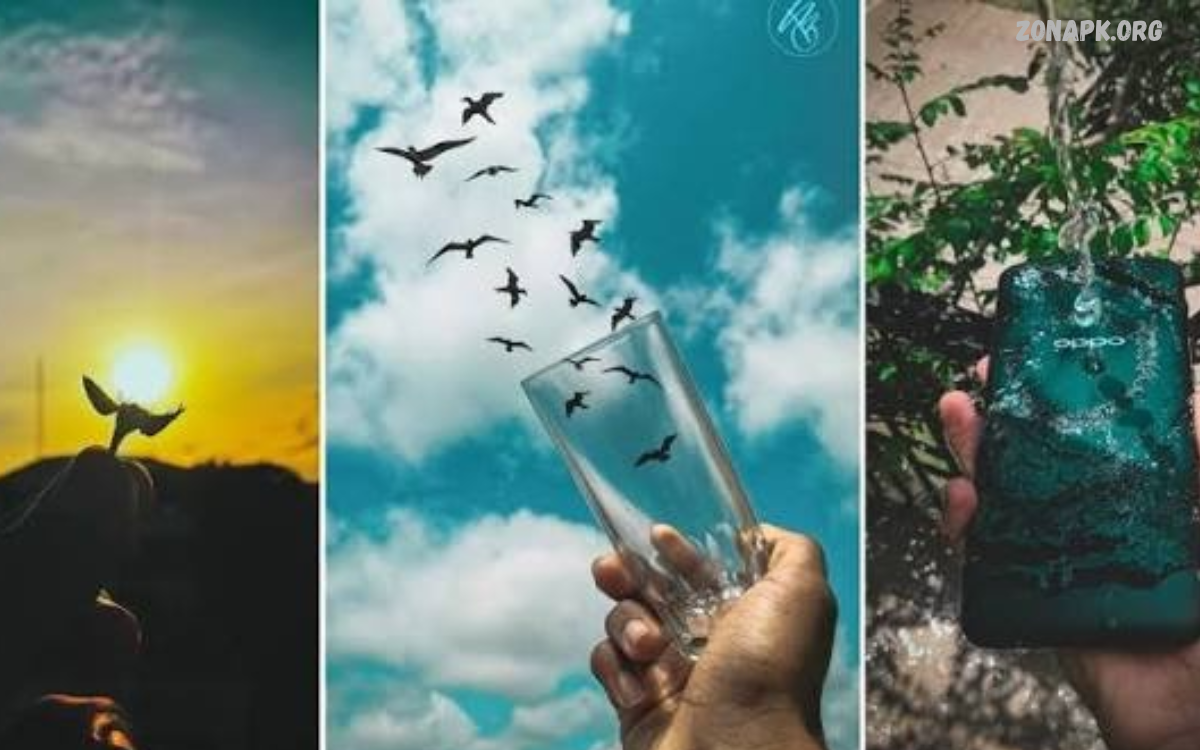
Smartphone photography makes it easy to capture beautiful moments, explore creativity, and create professional-looking images without expensive camera equipment.
Exploring smartphone photography ideas can transform ordinary pictures into eye-catching images for social media, blogs, travel albums, and personal collections.
Use Natural Light for Beautiful Photos
Natural light is one of the most important elements of smartphone photography. Morning and late-afternoon sunlight creates soft shadows, warm colors, and attractive highlights that make portraits, landscapes, and everyday objects look more appealing.
Try photographing near windows, under shaded areas, or outdoors during golden hour. When possible, avoid harsh midday sunlight, which can create strong shadows and bright highlights that reduce detail in your images.
Experiment with Golden Hour Photography
Golden hour occurs shortly after sunrise and before sunset, when sunlight appears warm and soft. This lighting creates beautiful colors, gentle shadows, and a pleasing atmosphere for portraits, landscapes, buildings, and outdoor scenes.
For creative smartphone photography ideas, capture silhouettes against colorful skies, photograph subjects facing the sunlight, or use backlighting to create a glowing effect. Experiment with different positions to discover how changing the direction of light transforms your pictures.
Try Creative Portrait Photography
Portrait photography focuses on capturing a person’s expression, personality, and natural appearance. Smartphone portrait modes can blur the background while keeping the subject sharp, creating an effect similar to photographs taken with professional cameras.
Choose a simple background, use soft lighting, and position your subject comfortably. Experiment with close-up portraits, candid moments, side profiles, and environmental portraits that include interesting surroundings to tell a more complete visual story.
Capture Stunning Nature Photography
Nature provides endless opportunities for creative smartphone photography. Flowers, leaves, trees, birds, clouds, rivers, and mountains offer different colors, textures, and patterns that help you practice composition and develop a stronger photographic style.
Move closer to small details, photograph landscapes from different heights, and observe how weather changes the scene. Early mornings can provide soft lighting and quieter surroundings, while cloudy days often produce balanced light for capturing natural colors.
Explore Macro Photography With Your Phone
Macro photography reveals tiny details that people often overlook in everyday life. You can photograph flower petals, water droplets, fabric textures, insects from a safe distance, and small household objects to create fascinating close-up images.
Use your smartphone’s dedicated macro mode if available, or move closer until the subject remains sharp. Keep your hands steady, use plenty of light, and avoid moving so close that the camera loses focus or blocks the light reaching your subject.
Create Beautiful Flat Lay Photography
Flat lay photography involves arranging objects on a flat surface and photographing them from directly above. This style works especially well for food, stationery, books, skincare products, accessories, and creative desk arrangements.
Choose a clean background, arrange objects with balanced spacing, and maintain a consistent color palette. Use window light and experiment with shadows, decorative elements, and different arrangements to create attractive images for social media posts and website content.
Take Better Food Photography
Food photography becomes more appealing when you focus on color, texture, lighting, and presentation. A freshly prepared meal, colorful fruit bowl, homemade dessert, or cup of coffee can become an interesting subject with thoughtful composition and natural light.
Photograph food near a window, capture close-up details, and try overhead or 45-degree angles. Keep the surrounding area tidy, include only useful props, and adjust the composition until the food remains the main focus of the photograph.
Use Leading Lines for Strong Composition
Leading lines guide the viewer’s attention toward the main subject. Roads, bridges, fences, staircases, hallways, and building edges can create natural lines that make smartphone photographs feel organized and visually engaging.
Position yourself so the lines lead toward an important point in the image. Experiment with straight, diagonal, and curved lines to create different moods, while checking the edges of the frame for distracting objects that weaken the composition.
Apply the Rule of Thirds
The rule of thirds is a simple composition technique that divides an image into nine sections using two horizontal and two vertical lines. Placing important subjects near these lines or their intersections can create a balanced and interesting photograph.
Enable the grid option in your smartphone camera settings and use it while photographing people, buildings, landscapes, and everyday objects. Although centered compositions can also work beautifully, moving the subject away from the center often creates more visual interest.
Capture Reflections for Artistic Photos
Reflections can add symmetry, depth, and creativity to smartphone photographs. Puddles, lakes, glass windows, mirrors, polished floors, and reflective buildings provide interesting opportunities to capture unusual perspectives and balanced compositions.
Look for reflections after rain or during calm weather, and experiment with photographing both the reflected scene and its surroundings. Lowering your phone closer to the reflective surface can produce a more dramatic effect and reveal details that are less visible from above.
Try Silhouette Photography
Silhouette photography emphasizes the shape of a subject against a bright background. Trees, people, bicycles, buildings, and other recognizable forms can create dramatic images when positioned against a colorful sunset or another strong light source.
Place your subject between the camera and the bright background, then tap the brightest area of the screen to help control exposure. The subject may become darker, allowing its outline to stand out against the background without requiring complicated editing.
Capture Creative Shadow Photography
Shadows can turn simple objects and ordinary surroundings into artistic photographic subjects. Window frames, plants, railings, patterned fabrics, and sunlight passing through objects can create interesting shapes across walls, floors, and outdoor surfaces.
Look for strong patterns during sunny weather and position your subject where the shadows create a pleasing arrangement. Black-and-white editing can emphasize contrast, while color photography can preserve the warmth and atmosphere of the original scene.
Photograph Architecture and Buildings
Architectural photography focuses on buildings, bridges, monuments, interiors, and other structures. Smartphones make it easy to capture geometric patterns, repeating windows, dramatic rooftops, and the contrast between modern designs and traditional architecture.
Keep the phone level when photographing tall buildings to reduce unwanted distortion, and experiment with symmetrical compositions. Include interesting foreground elements or photograph details such as doors, staircases, and decorative surfaces to create a varied architectural photo collection.
Discover Minimalist Photography
Minimalist photography uses simple compositions, limited colors, and plenty of empty space to create strong visual impact. A single flower, a chair beside a window, a person against a plain wall, or an isolated object can become an effective subject.
Choose uncluttered backgrounds and remove unnecessary elements from the frame. Pay attention to shape, texture, and the relationship between the subject and surrounding space, allowing a small number of visual elements to communicate the main idea clearly.
Create Motion Photography
Motion photography captures movement and energy in everyday scenes. Flowing water, moving vehicles, running pets, dancing, sports, and people walking through busy streets can provide opportunities to create dynamic smartphone images.
Use burst mode when photographing fast-moving subjects, or try your phone’s motion-photo features if available. For a sharper result, follow the moving subject with your camera and take several pictures, then choose the frame with the clearest expression and most interesting composition.
Experiment With Night Photography
Night photography allows you to capture city lights, illuminated buildings, moonlit landscapes, and colorful streets after dark. Modern smartphones often include night modes that combine multiple exposures to improve brightness and preserve details in low-light conditions.
Hold your phone steady, avoid unnecessary digital zoom, and look for well-lit subjects that create contrast against darker surroundings. Use a stable surface or tripod when possible, and remember that bright signs, reflections, and vehicle lights can become attractive elements within your composition.
Photograph the Night Sky
The night sky offers opportunities to photograph stars, moonlight, and interesting atmospheric scenes. Results depend on your smartphone camera, available light, weather, and the amount of light pollution around your location.
Choose a dark location away from bright artificial lights, stabilize your phone, and use a dedicated night or long-exposure mode when available. Keep expectations realistic because many smartphones cannot capture faint stars clearly without specialized camera controls or suitable conditions.
Capture Candid Everyday Moments
Candid photography records natural moments without requiring people to pose directly for the camera. Family gatherings, friends enjoying a conversation, pets playing, street scenes, and ordinary daily activities can all provide meaningful photographic subjects.
Keep your phone accessible and observe what happens around you instead of planning every shot. Use natural light, anticipate interesting moments, and photograph respectfully, especially in public spaces where people may not expect to appear in someone else’s pictures.
Use Different Camera Angles
Changing your shooting angle is one of the easiest smartphone photography ideas for creating distinctive images. Instead of always holding your phone at eye level, photograph subjects from above, below, the side, or close to the ground to discover fresh perspectives.
A low angle can make buildings appear more dramatic, while an overhead view works well for food and arranged objects. Try several viewpoints before taking your final picture, and consider how each angle changes the background, proportions, and relationship between subjects.
Try Symmetry and Patterns
Symmetry creates a sense of order by balancing visual elements on opposite sides of an image. Reflections, architectural entrances, tiled floors, bridges, and repeated objects can provide natural symmetry that makes smartphone photographs especially satisfying to view.
Patterns also create visual interest through repeated shapes, colors, and textures. Photograph rows of windows, colorful market displays, leaves, or geometric surfaces, then introduce one contrasting element to break the pattern and draw attention toward a particular area.
Capture Travel Photography Creatively
Travel photography helps preserve memories of destinations, local culture, landscapes, food, architecture, and everyday life. Your smartphone can capture these experiences without requiring a large camera bag, making it convenient for exploring cities and natural locations.
Look beyond famous landmarks and photograph small details such as street signs, traditional crafts, local markets, and interesting doorways. Combine wide landscape shots with close-up images and candid scenes to create a more complete visual record of your journey.
Create Interesting Street Photography
Street photography documents everyday life in public spaces, including people, architecture, transportation, and unexpected interactions. Interesting compositions often appear when light, movement, and background elements come together at the right moment.
Walk slowly, observe changing scenes, and look for contrasting colors, strong shadows, or repeating shapes. Keep your camera ready without disturbing others, and respect personal privacy when photographing identifiable people, particularly in sensitive situations.
Read Also: AI Digital Artwork: A Complete Guide to Creating Stunning AI Art
Use Water for Creative Photography
Water creates beautiful photographic effects through reflections, movement, transparency, and droplets. You can photograph rain on windows, fountains, flowing streams, ocean waves, or droplets on leaves to produce images with texture and atmosphere.
Try freezing splashes with a fast shutter setting if your smartphone supports manual controls, or use a longer exposure to create smoother water effects when available. Protect your phone from moisture, and avoid placing it near water where a slip could damage the device.
Take Creative Self-Portraits
Self-portraits provide a way to explore lighting, composition, expressions, and visual storytelling without needing another photographer. A smartphone tripod, timer, or remote shutter can help you take photographs with more flexibility and experiment with different scenes.
Choose an environment that reflects your personality, use soft lighting, and pay attention to the background. Try different poses, natural expressions, silhouettes, and environmental compositions rather than relying on the same angle for every photograph.
Make Your Photos Look Professional With Editing
Photo editing can improve brightness, contrast, color balance, sharpness, and composition. Smartphone editing apps provide simple controls that help you refine images while preserving the details that made the original scene interesting.
Start with small adjustments instead of applying strong filters immediately. Straighten the horizon, crop distractions, recover highlights when possible, and adjust shadows carefully, aiming for a natural result that matches the atmosphere of the original photograph.
Experiment With Black-and-White Photography
Black-and-white photography removes color to emphasize contrast, texture, shape, and emotion. Portraits, architectural details, street scenes, and dramatic shadows can become more powerful when distracting colors no longer compete for attention.
Try monochrome mode while shooting or convert selected images during editing. Look for strong differences between light and dark areas, interesting surface textures, and clear subject outlines to create images that remain visually engaging without color.
Use Smartphone Camera Settings Effectively
Learning your smartphone camera settings helps you gain more control over the final image. Features such as exposure adjustment, focus lock, grid lines, portrait mode, HDR, and night mode can improve results in different shooting situations.
Tap the subject to focus before taking a picture, and adjust exposure when the image looks too bright or too dark. Clean the camera lens regularly, use the main camera when image quality matters, and avoid excessive digital zoom that can make details appear less sharp.
Try HDR Photography for Balanced Exposure
High Dynamic Range, commonly called HDR, helps balance bright and dark areas in scenes with challenging lighting. It can be useful when photographing landscapes, buildings against bright skies, and interiors containing both sunny windows and darker corners.
Enable automatic HDR when your phone offers it, then compare the results with standard photographs. HDR works best when the scene contains different brightness levels, although moving subjects or strong artistic lighting may sometimes produce better results without it.
Explore Creative Smartphone Photography Ideas for Social Media
Social media photography often benefits from clear subjects, thoughtful colors, consistent framing, and strong visual storytelling. You can create engaging posts by photographing outfits, food, travel destinations, everyday routines, creative workspaces, or small details that reflect your interests.
Choose a visual style that suits your content rather than copying every popular trend. Experiment with portrait and landscape framing, keep backgrounds organized, and make sure your photographs remain clear and authentic when viewed on smaller screens.
Create a Photography Challenge
A photography challenge gives you a simple way to practice consistently and discover new creative possibilities. Choose one theme each day, such as shadows, reflections, textures, symmetry, nature, architecture, or a particular color, and find different ways to photograph it.
Review your results at the end of each week and identify the techniques that worked best. This routine encourages observation, improves your understanding of light and composition, and helps you develop a personal style without needing expensive equipment.
Common Smartphone Photography Mistakes to Avoid
Some common mistakes include dirty camera lenses, excessive digital zoom, distracting backgrounds, poor focus, and photographs taken in difficult lighting without adjusting exposure. These problems can reduce image quality even when your smartphone has an advanced camera system.
Before taking a picture, clean the lens, check the edges of the frame, and make sure the main subject is sharp. Take several versions when necessary, experiment with composition, and review the results so you can recognize what needs improvement.
Frequently Asked Questions
How Can I Take Better Photos With My Smartphone?
Use natural light, keep your camera lens clean, tap the screen to focus, and experiment with different angles. Simple composition techniques, including the rule of thirds and leading lines, can make ordinary scenes look more interesting.
What Are the Best Smartphone Photography Ideas for Beginners?
Beginners can start with nature photography, food pictures, portraits, reflections, shadows, and flat lays. These subjects are easy to find and provide opportunities to practice lighting, focus, framing, and composition in familiar surroundings.
How Can I Make Smartphone Photos Look Professional?
Professional-looking smartphone photos usually combine good lighting, clear focus, balanced composition, and careful editing. Choose uncluttered backgrounds, avoid excessive zoom, and use the camera settings that suit the subject and environment.
Which Lighting Is Best for Smartphone Photography?
Soft natural light is a reliable choice for many types of smartphone photography. Early morning, late afternoon, and shaded outdoor locations can produce pleasing colors and reduce the harsh shadows associated with direct midday sunlight.
Which Apps Can Improve Smartphone Photography?
Many smartphones include built-in photo editors, while third-party applications offer additional controls for color correction, cropping, sharpening, and creative effects. The best choice depends on your device, preferred editing style, and the tools you actually need.
Conclusion
Smartphone photography ideas can help you discover creative ways to capture everyday moments, beautiful landscapes, portraits, food, architecture, and artistic details.
The best way to build your skills is to practice regularly and experiment with different techniques. Try new angles, watch how light changes throughout the day, and challenge yourself to photograph familiar subjects in new ways.

1 Comment
Pingback: AI Art Generator Apps: Best Tools for Creating Stunning Digital Artwork - Zonapk