

The best photo collage maker apps help users combine multiple pictures into one attractive design. These apps provide creative layouts, stylish frames, backgrounds, filters, stickers, and text options.
Photo collages offer a simple way to organize memories, highlight special moments, and create engaging social media posts. Modern editing tools make collage creation easier for beginners and experienced creators.
What Are Photo Collage Maker Apps?
Photo Collage Maker Apps are mobile editing applications designed to combine multiple photographs into a single composition. Users can select pictures, choose layouts, adjust spacing, and customize backgrounds.
These applications offer different creative options for personal projects, digital albums, birthday memories, travel collections, and social media content. Most tools provide simple editing controls for quick results.
Best Photo Collage Maker Apps
The right collage app depends on your editing preferences, available features, and creative goals. Some applications focus on simple photo grids, while others provide advanced design tools.
The following applications offer different approaches to collage creation, including professional templates, freestyle layouts, filters, stickers, and customization options.
Canva
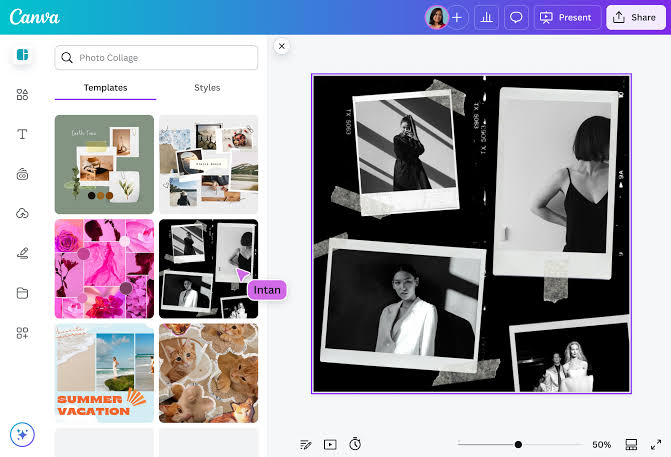
Canva is a popular graphic design application with flexible photo collage features. Users can explore ready-made templates, arrange photographs, customize backgrounds, and add attractive text elements.
Its drag-and-drop editing experience makes collage creation accessible to beginners. Users can also create invitations, posters, social media graphics, and other visual projects within one application.
Picsart
Picsart combines photo editing tools with creative collage features. Users can arrange multiple photographs, apply artistic effects, adjust colors, and personalize designs through different editing options.
Its creative environment suits users interested in experimental layouts and decorative designs. Additional features include filters, stickers, text styles, and background editing tools.
PicCollage
PicCollage focuses on creative photo arrangements and scrapbook-style designs. Users can combine pictures, add decorative elements, customize backgrounds, and create personalized compositions.
The application offers a beginner-friendly editing experience with different templates and creative layouts. It works well for memory collections, celebration designs, and casual social media projects.
PhotoGrid
PhotoGrid provides collage creation tools with multiple layout choices and editing options. Users can arrange several pictures, apply filters, add stickers, and customize the overall appearance.
Its grid-based approach makes photo organization convenient. Users can create simple collections or more decorative compositions without requiring advanced graphic design knowledge.
Adobe Express
Adobe Express offers design tools suitable for professional-looking photo collages. Users can combine photographs with typography, backgrounds, shapes, and ready-made templates.
The application also supports different creative projects beyond collage editing. Its design-focused features help users create organized visual content for presentations, personal projects, and social media.
Fotor
Fotor combines photo editing and collage creation in one creative environment. Users can select layouts, adjust images, customize backgrounds, and apply visual enhancements.
Its editing features make it useful for people who want more control over the final composition. Users can experiment with different arrangements while maintaining a consistent visual style.
InShot
InShot is widely recognized for mobile photo and video editing. Its creative tools support social media content, image adjustments, filters, and different visual editing projects.
Users can prepare photographs before combining them into attractive layouts. Its straightforward interface makes basic editing convenient for beginners and regular content creators.
Moldiv
Moldiv provides stylish collage layouts inspired by magazines and creative photography. Users can arrange pictures inside decorative frames and apply filters to create coordinated visual compositions.
Its design options suit users interested in fashion-inspired layouts, personal albums, and artistic photo collections. Different editing controls help customize individual pictures before finalizing a collage.
Google Photos
Google Photos offers convenient photo organization and basic collage creation features. Users can select pictures from their collections and create simple visual arrangements.
Its straightforward approach makes it useful for people who prefer uncomplicated editing. The application also helps organize personal photographs and keep memorable moments accessible.
BeFunky
BeFunky offers creative editing features alongside collage-making tools. Users can experiment with layouts, adjust photographs, apply effects, and customize visual designs.
Its interface provides accessible controls for creating attractive compositions. Users interested in combining basic editing with collage creation may find its features useful.
Important Features of Photo Collage Maker Apps
A good collage application should provide flexible layouts, simple editing controls, attractive backgrounds, and convenient export options. These features help users create organized designs without complicated editing processes.
Additional features such as stickers, filters, text customization, and photo adjustment tools improve creative possibilities. Choosing an application with useful features can make the entire editing experience more enjoyable.
Multiple Collage Layouts
Layout variety plays an important role in collage creation. Different grid structures allow users to combine two, four, six, or more photographs according to their preferred design.
Flexible layouts also help create balanced compositions for different occasions. Users can select symmetrical grids, creative frames, or freestyle arrangements depending on their project.
Photo Filters and Effects
Filters help improve the visual appearance of photographs. Users can adjust colors, brightness, contrast, saturation, and other image properties before adding pictures to a collage.
Creative effects provide additional opportunities to develop a consistent design. Applying similar adjustments across photographs can make the final composition look more organized.
Background Customization
Background customization allows users to change the appearance of empty spaces surrounding photographs. Popular choices include solid colors, gradients, patterns, and decorative textures.
A suitable background improves the overall presentation without distracting from the main pictures. Users should select backgrounds that complement photograph colors and maintain visual balance.
Stickers and Decorative Elements
Stickers provide an easy way to personalize photo collages. Users can add decorative shapes, symbols, illustrations, and themed elements according to their creative preferences.
However, decorative elements should support the main photographs rather than overcrowd the design. A balanced arrangement usually creates a cleaner and more attractive result.
Text and Font Customization
Text tools help users add captions, dates, short messages, and meaningful titles to photo collages. Different fonts and colors provide opportunities to personalize each composition.
Clear typography improves readability and makes designs more informative. Users should select suitable font sizes and maintain enough space between text and photographs.
High-Quality Image Export
Export quality determines how clearly a finished collage appears after saving. Applications offering suitable resolution options help preserve image details and maintain visual quality.
Users should also check available file formats, watermark restrictions, and export settings. These details become especially important when preparing collages for printing or professional projects.
How to Create a Photo Collage
Creating a photo collage usually requires only a few simple steps. Start by selecting an application, opening its collage editor, and choosing photographs from your device.
After selecting pictures, choose a suitable layout and customize spacing, backgrounds, filters, and text. Review the final composition before saving it in your preferred image format.
Choose the Right Photographs
Photograph selection is the foundation of an attractive collage. Choose clear images that represent the same event, subject, theme, or memorable experience.
Avoid adding too many unrelated pictures because they can make the design confusing. A carefully selected collection creates a more meaningful visual story.
Select a Suitable Layout
Choose a layout according to the number of photographs and the purpose of your project. Simple grids work well for organized collections, while freestyle arrangements offer greater creative flexibility.
Consider image orientation and available space before placing photographs. A suitable layout helps maintain balance and prevents important details from becoming hidden.
Read Also: Best Portrait Editing Apps: for Stunning and Natural-Looking Photos
Customize the Design
After arranging photographs, personalize the composition with backgrounds, borders, filters, and decorative elements. Keep colors and visual styles consistent throughout the design.
Add short captions or titles when they improve the meaning of the collage. Avoid unnecessary decorations that reduce photograph visibility.
Save and Share Your Collage
Review the finished composition before exporting it. Check photograph placement, text readability, image quality, and spacing to identify any unwanted design issues.
Choose an appropriate resolution and file format according to your intended use. Save a copy of the finished design before sharing it through your preferred platform.
Best Photo Collage Maker Apps for Android
Android users can explore several applications for creating attractive photo collages. Canva, Picsart, PicCollage, PhotoGrid, and Google Photos offer different approaches to image arrangement and customization.
The best option depends on device compatibility, editing preferences, and available features. Users should review application permissions and free-version limitations before choosing a tool.
Best Photo Collage Maker Apps for iPhone
iPhone users can explore creative applications such as Canva, Picsart, PicCollage, Adobe Express, and Moldiv. These options provide different combinations of templates, layouts, filters, and editing controls.
Some applications focus on quick photo arrangements, while others provide more detailed customization. Selecting an option that matches personal requirements helps create a convenient editing experience.
Free Photo Collage Maker Apps
Free collage applications provide useful editing features without requiring an immediate subscription. Many include basic layouts, photo adjustments, backgrounds, and selected decorative elements.
However, free versions may include advertisements, premium templates, watermarks, or export restrictions. Users should review available features before spending time creating a detailed project.
Photo Collage Apps for Social Media
Social media creators often use collages to present multiple photographs in one organized design. These compositions work well for travel memories, celebrations, photography collections, and personal updates.
Choosing suitable dimensions helps maintain image quality across different platforms. Users should also keep important photographs and text away from edges that may be cropped.
Photo Collage Apps for Personal Memories
Personal photo collages provide an organized way to preserve memorable experiences. Users can combine family celebrations, holidays, birthdays, and everyday moments into one composition.
Adding dates, short captions, and meaningful backgrounds can make these designs more personal. Digital collages also provide convenient options for organizing photographs into themed collections.
Photo Collage Apps for Professional Projects
Professional users can create visual presentations, promotional graphics, product collections, and photography portfolios through collage applications. Organized layouts help present multiple images in a clear format.
Applications with typography, customizable templates, and high-quality exports are particularly useful for design-related projects. Consistent colors and balanced spacing improve the overall presentation.
Tips for Creating Attractive Photo Collages
Start with a clear theme and select photographs that support the same visual idea. Use balanced layouts, coordinated colors, and readable text to maintain a consistent appearance.
Avoid unnecessary effects and excessive decorations. Keeping the composition simple allows important photographs to remain the main focus.
Common Mistakes to Avoid
Adding too many photographs can make a collage crowded and difficult to understand. Poor spacing, inconsistent colors, and excessive stickers can also reduce the overall design quality.
Another common mistake involves ignoring export settings. Always review image resolution, watermark restrictions, and file format before saving the completed composition.
Privacy and Security When Using Collage Apps
Photo editing applications may request access to device photographs, storage, cameras, or other features. Review permissions carefully and allow access only when necessary for the intended editing task.
Avoid uploading private photographs to unfamiliar services without understanding their privacy practices. Choosing reputable applications and reviewing account settings can support safer photo management.
How to Choose the Best Photo Collage Maker App
Start by identifying the type of collage you want to create. Simple photo grids require fewer tools, while scrapbook designs and professional compositions benefit from more customization.
Compare layout options, editing controls, export quality, advertisements, and subscription requirements. The best app provides useful features without making the editing process unnecessarily complicated.
Frequently Asked Questions
What Are the Best Photo Collage Maker Apps?
Canva, Picsart, PicCollage, PhotoGrid, and Adobe Express are popular options. Each application offers different layouts and customization features.
Which Photo Collage App Is Best for Beginners?
Canva, Google Photos, and PicCollage offer accessible editing experiences. Their straightforward controls make basic collage creation easier.
Can I Create Photo Collages for Free?
Yes, several applications provide free collage-making features. However, premium templates, advanced editing tools, and certain export options may require payment.
Which App Offers Professional Collage Designs?
Canva and Adobe Express provide design-focused tools suitable for polished compositions. Their templates and customization options support a range of creative projects.
Are Photo Collage Maker Apps Available for Android?
Yes, several collage applications support Android devices. Availability and features may vary depending on the device and application version.
Can I Create Photo Collages on iPhone?
Yes, iPhone users can create collages through applications such as Canva, Picsart, PicCollage, and other compatible editing tools.
How Many Photos Can I Add to a Collage?
The number of photos depends on the app and layout you choose. Some tools support simple grids, while others provide more flexible arrangements.
Do Collage Maker Apps Reduce Photo Quality?
Some applications may reduce image quality during export. Choosing the right resolution settings helps preserve photo details.
Can I Add Text to Photo Collages?
Yes, many collage applications include text customization features. Users can add captions, titles, dates, and short messages.
Which Features Should I Check Before Installing a Collage App?
Check layout variety, editing tools, export quality, privacy permissions, watermark policies, and subscription requirements before installing an application.
Conclusion
The best photo collage maker apps make it easier to combine photographs, organize memories, and create attractive visual designs. Canva, Picsart, PicCollage, PhotoGrid, Adobe Express, and other applications provide different creative options.
Before choosing an application, consider your editing goals, preferred layouts, device compatibility, and available features. The right collage maker can turn ordinary photographs into organized, meaningful, and visually appealing compositions.
