

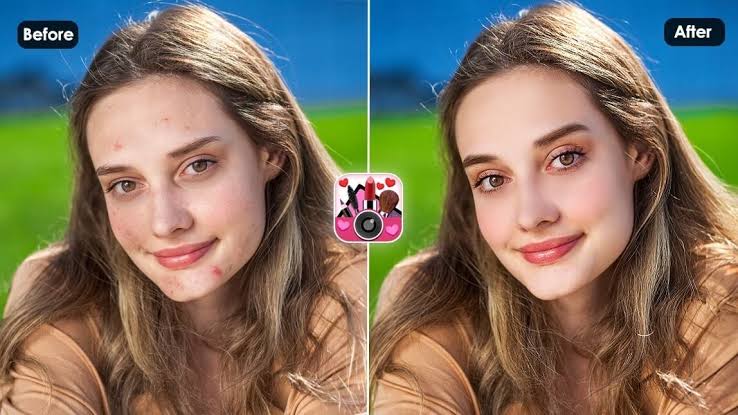
Photo editing has become an important part of modern digital photography. The Best Photo Retouching Apps help users improve portraits, enhance image quality, adjust lighting, and create professional-looking pictures without complicated editing software.
Modern smartphones capture impressive photos, but some pictures need a few tweaks before sharing. Photo retouching apps offer features such as blemish removal, skin smoothing, background editing, color correction, and detail enhancement.
What Are Photo Retouching Apps?
Photo retouching apps are mobile applications that improve photographs with digital editing tools. Users can adjust brightness, contrast, colors, sharpness, and other visual elements to improve image presentation. Many applications also include automatic enhancement features.
These apps support different photography styles, including portraits, landscapes, product photography, and social media content. Their editing tools let users make creative adjustments while preserving important details in photographs. Some applications provide advanced controls for more precise editing.
Why Use the Best Photo Retouching Apps?
The Best Photo Retouching Apps provide convenient editing solutions without requiring expensive desktop software. Users can improve photos directly on smartphones and apply adjustments in minutes. This makes mobile editing useful for everyday photography.
Another advantage involves creative flexibility. Users can experiment with different filters, lighting effects, colors, and textures to develop their preferred photography style. These applications also help content creators prepare attractive images for digital platforms.
Best Photo Retouching Apps for Android and iPhone
Several mobile applications offer useful features for photo enhancement and portrait editing. Each application provides different editing tools, interface designs, and creative possibilities. Comparing these options can help users find an application that matches their needs.
Some applications focus on detailed manual adjustments, while others simplify editing through automatic effects. The following options are popular choices for users interested in mobile photo retouching and creative image enhancement.
Adobe Lightroom Photo Editor
Adobe Lightroom is a powerful photo editing application designed for detailed image adjustments. It provides controls for exposure, contrast, highlights, shadows, color temperature, and saturation. These features help users improve photographs while maintaining control over their appearance.
Lightroom also includes presets that simplify editing by applying coordinated adjustments. Users can create consistent photography styles and manage different editing projects. Its advanced color tools make it suitable for portrait photography, landscapes, and social media images.
Snapseed Photo Editing App
Snapseed is a popular photo editing application developed by Google. It offers a collection of editing tools that allow users to improve image quality through detailed adjustments. Its interface supports both simple editing and more advanced creative techniques.
The application includes selective adjustments, healing, perspective correction, curves, and other useful features. Users can edit specific image areas without changing the entire photograph. Snapseed is especially useful for people who prefer manual editing controls.
PicsArt Photo Editor
PicsArt combines photo retouching, creative editing, filters, and graphic design features within one application. Users can improve portraits, adjust colors, remove unwanted objects, and experiment with artistic effects. Its variety of tools supports different creative projects.
The application also provides collage-making features, stickers, text effects, and background editing options. These features make PicsArt useful for social media content and personal photography projects. Some advanced tools require a paid subscription.
Facetune Photo Retouching App
Facetune focuses primarily on portrait photography and selfie enhancement. Its editing features include facial detail adjustments, lighting improvements, skin texture controls, and other portrait-focused tools. Users can make controlled adjustments to individual photographs.
The application is designed for people who frequently edit selfies and portrait images. Its tools provide options for improving image clarity and adjusting lighting. Users should apply effects carefully to maintain natural-looking photographs.
YouCam Perfect
YouCam Perfect offers portrait editing, photo enhancement, and creative photography features. Its tools include image adjustments, filters, background editing, and portrait enhancement options. The application provides a straightforward editing experience for smartphone users.
Users can experiment with different effects and make adjustments according to their photography preferences. Its automatic features can simplify common editing tasks. Availability of specific tools may depend on the device, application version, and subscription.
PhotoDirector Photo Editor
PhotoDirector provides a combination of traditional editing tools and AI-powered image enhancement features. Users can adjust image colors, improve lighting, remove unwanted objects, and experiment with creative effects. Its interface supports different levels of editing experience.
The application also offers background adjustments, artistic filters, and portrait editing options. These features make it useful for users who want more than basic photo enhancement. Some premium features require an active subscription.
AirBrush Photo Editor
AirBrush is designed for selfie enhancement and portrait retouching. It provides tools for adjusting lighting, improving image details, smoothing textures, and applying different visual effects. Its interface makes common portrait editing tasks relatively simple.
The application also includes filters and beauty-related editing options. Users can control adjustments to achieve their preferred photography appearance. It works well for people interested in straightforward portrait editing.
Fotor Photo Editor
Fotor provides photo enhancement tools, filters, effects, and creative editing features. Its editing interface supports common adjustments such as brightness, contrast, saturation, and sharpness. Users can improve photographs without needing extensive technical knowledge.
The application also includes AI-powered editing features and design tools. These options make it useful for different photography projects, including social media graphics and personal image collections. Certain advanced features may require payment.
VSCO Photo Editor
VSCO is known for its photography filters and color grading tools. The application provides editing options that help users create consistent visual styles across multiple photographs. Its interface focuses on a clean and creative editing experience.
Users can adjust exposure, contrast, white balance, saturation, and other image properties. Its presets are useful for photographers who prefer a particular visual appearance. Some filters and advanced editing features are available through paid membership.
TouchRetouch Photo Editing App
TouchRetouch specializes in removing unwanted objects from photographs. Its tools help users clean up images by removing distractions such as unwanted background elements and small visual imperfections. This makes it useful for improving photograph composition.
The application focuses on object removal rather than providing a complete photo editing experience. Users can combine it with other editing applications for additional adjustments. Its specialized features are particularly useful for travel and everyday photography.
Important Features of Photo Retouching Apps
Choosing an editing application becomes easier when users understand the features that matter most. Different tools serve different purposes, so selecting an app with suitable editing options can improve the overall experience. A good application should offer convenient controls and reliable results.
Some users need simple enhancement tools, while others prefer advanced editing capabilities. Understanding these differences helps avoid unnecessary features and complicated interfaces. The following features are important when comparing photo retouching applications.
Skin Retouching Tools
Skin retouching tools help users adjust portrait details and improve image presentation. Depending on the application, these features may include texture adjustments, blemish correction, and lighting improvements. They provide greater control over portrait photographs.
Natural-looking editing is important when using these features. Excessive adjustments can remove important image details and create unrealistic results. Moderate editing helps preserve the original appearance of photographs.
Background Removal
Background removal allows users to separate a photograph’s main subject from its surroundings. This feature can help create product images, profile pictures, and creative designs. Some applications use automatic detection to simplify the process.
Advanced background editing tools may also provide replacement backgrounds and additional adjustment options. Users can choose suitable backgrounds according to their photography projects. Accurate subject selection helps produce cleaner results.
Object Removal Tools
Object removal features help eliminate unwanted elements from photographs. These tools can be useful when distracting objects appear in the background or interfere with image composition. Some applications automatically fill the edited area.
The quality of object removal depends on image complexity and the surrounding details. Simple backgrounds generally produce better results than complicated patterns. Reviewing the final image helps identify editing imperfections.
Color Correction
Color correction helps improve the overall appearance of photographs by adjusting different color properties. Users can control saturation, temperature, tint, and individual color tones. These adjustments can make images appear more balanced.
Advanced applications may include selective color controls for more detailed editing. These features help users modify specific colors without changing every part of the photograph. Proper color correction supports consistent photography styles.
Lighting and Exposure Adjustments
Lighting adjustments help users improve photographs captured in difficult lighting conditions. Exposure controls can make images brighter or darker, while highlights and shadows provide additional control over different areas. These features are useful for many photography styles.
Some applications also include automatic lighting enhancement. These tools analyze photographs and suggest adjustments based on image conditions. Manual controls remain useful when users want more precise results.
AI Photo Retouching Features
Artificial intelligence has introduced new possibilities for mobile photo editing. AI-powered tools can recognize image elements, improve certain details, remove unwanted objects, and support automatic enhancement. These features simplify tasks that previously required more manual work.
AI editing tools can save time, but their results should always be reviewed. Complex photographs may produce imperfect selections or unnatural effects. Combining automatic enhancement with manual adjustments can improve the final outcome.
How to Choose the Best Photo Retouching App
Selecting the right application depends on personal editing goals and device requirements. Users should consider the available tools, interface design, performance, and pricing before choosing an application. An app with many features is not always the best option.
Beginners may prefer applications with simple controls and automatic enhancement options. Experienced photographers may need selective adjustments, advanced color grading, and detailed editing controls. Matching features with actual requirements helps create a better editing experience.
Check Device Compatibility
Before installing an application, check whether it supports your smartphone and operating system. Some advanced editing tools require newer devices or updated software versions. Compatibility can also affect application performance.
Reviewing storage requirements and available permissions is useful before installation. Applications with large editing libraries may require additional storage space. Keeping enough free storage can help maintain smooth performance.
Compare Free and Paid Features
Many photo retouching applications provide free editing tools alongside optional premium subscriptions. Free versions can be sufficient for basic adjustments, filters, and simple portrait editing. However, certain advanced features may remain locked.
Paid subscriptions sometimes include additional filters, AI tools, cloud storage, and premium editing options. Users should compare subscription costs with the features they actually need. Checking pricing before subscribing helps avoid unexpected expenses.
Look for an Easy Interface
An easy-to-use interface makes photo editing more convenient. Clear menus, accessible controls, and organized editing options help users complete tasks without unnecessary confusion. Beginners especially benefit from simple navigation.
Advanced users may prefer applications with detailed controls and customizable editing options. A good interface should make important tools accessible without overwhelming the screen. Testing an application’s free version can help evaluate its usability.
Review Export Quality
Export quality is an important factor when choosing a photo editing application. Some applications provide different image resolution and file format options. These settings influence how photographs appear after editing.
Users should check whether the application preserves important image details during export. High-quality export options are particularly useful for printing, professional projects, and digital publishing. Avoid unnecessary compression when image quality matters.
Tips for Professional Photo Retouching
Professional-looking photo editing depends on careful adjustments rather than applying every available effect. Users should understand the original lighting, colors, and composition before making changes. A balanced editing approach helps maintain image quality.
Developing a consistent workflow can also improve results. Start with basic corrections, make targeted adjustments, and review the final photograph before exporting. This approach works across different mobile photo editing applications.
Start With Basic Adjustments
Begin by correcting exposure, brightness, contrast, and white balance. These adjustments create a balanced foundation for further editing. Correcting basic image problems first can reduce the need for excessive effects.
After basic corrections, review highlights, shadows, and saturation. Make small changes instead of applying extreme settings immediately. Comparing the edited photograph with the original can help maintain visual balance.
Avoid Excessive Filters
Filters can change the mood and appearance of photographs within seconds. However, applying too many effects can reduce natural colors and hide important details. Selecting a suitable filter helps maintain a consistent visual style.
Adjusting filter intensity can produce more controlled results. Consider the photograph’s lighting and subject before selecting an effect. Simple editing often produces cleaner photographs than excessive processing.
Read Also: The Amazon Seller Expert Shortlist: 8 Specialists for Marketplace Growth and Account Optimization
Maintain Natural Image Details
Preserving original image details is important when editing portraits and other photographs. Excessive smoothing or sharpening can create unwanted visual effects. Balanced adjustments help photographs retain their original characteristics.
Reviewing images at different zoom levels can reveal editing problems. Small details may become less noticeable when photographs are viewed on a smaller screen. Checking the entire image before saving helps improve the final result.
Use High-Quality Original Photos
The quality of the original photograph affects the final editing result. Images captured with good lighting and proper focus generally provide more flexibility during retouching. Starting with a clear photograph makes editing easier.
Avoid repeatedly saving and compressing the same image. Multiple editing and export cycles can reduce image quality in some applications. Keeping an original copy allows users to return to the starting photograph whenever needed.
Common Mistakes to Avoid During Photo Retouching
Photo retouching can improve image presentation, but incorrect adjustments may reduce quality. Beginners sometimes apply too many filters or make unnecessary changes. Understanding common mistakes helps users develop better editing habits.
Another common issue involves ignoring the original photograph’s lighting and composition. Editing should support the image rather than completely change its purpose. A thoughtful approach creates more consistent results across different photography projects.
Applying Too Many Effects
Using multiple effects can make photographs appear visually crowded. Different filters may conflict with each other and produce inconsistent colors. Selecting a limited number of suitable adjustments usually creates a cleaner appearance.
Users should review each effect before applying another one. Removing unnecessary adjustments can improve the final image. Keeping editing simple also makes it easier to reproduce a consistent photography style.
Ignoring Image Resolution
Low-resolution images may lose important details during editing and exporting. Enlarging small photographs can also reduce sharpness. Checking original image quality helps users choose suitable export settings.
Some applications provide resolution controls during the export process. Selecting appropriate settings can help preserve image clarity. Users should consider where the photograph will be displayed before choosing its final resolution.
Overediting Portrait Photographs
Portrait editing should focus on improving image presentation while preserving natural details. Excessive smoothing, reshaping, and other adjustments can create unrealistic results. Careful editing produces more balanced photographs.
Users should review portrait adjustments alongside the original image. This comparison helps identify unnecessary changes. Maintaining natural textures and realistic lighting can improve the overall result.
Not Saving Original Images
Editing directly over an original photograph can create problems when users want to reverse changes later. Keeping an untouched copy provides greater flexibility. Many applications also support non-destructive editing features.
Saving different versions can help organize editing projects. Users can compare adjustments and select their preferred result without losing the original file. This habit is useful for both personal and professional photography.
Best Photo Retouching Apps for Different Needs
Different photography projects require different editing capabilities. A portrait photographer may need detailed facial and lighting adjustments, while a social media creator may prefer filters and graphic design tools. Selecting an application according to the project makes editing more efficient.
Some users also combine multiple applications to complete their work. One app may provide detailed color correction, while another specializes in removing unwanted objects. This approach offers greater flexibility when working with different photographs.
Best Apps for Portrait Editing
Portrait editing applications focus on improving lighting, skin texture, and image details. Facetune, AirBrush, and YouCam Perfect provide portrait-focused editing features. These options are useful for users who frequently work with selfies and personal photographs.
Adobe Lightroom and Snapseed also support portrait editing through manual adjustments. Their controls allow users to modify lighting and colors without relying entirely on automatic effects. The best choice depends on the preferred editing workflow.
Best Apps for Background Editing
Background editing requires tools that can separate subjects from surrounding elements. PicsArt and PhotoDirector offer background-related editing features that support creative projects. Users can experiment with different backgrounds and image compositions.
Some applications also include automatic subject detection. These tools can simplify editing when photographs contain clear subjects. Reviewing the selection carefully helps prevent unwanted changes around important image details.
Best Apps for Removing Unwanted Objects
Object removal applications are useful when photographs contain distracting elements. TouchRetouch specializes in this task, while some general editing applications also provide object removal features. These tools can improve the overall composition.
The final result depends on the complexity of the background. Users should inspect edited areas for repeated patterns or visual inconsistencies. Making smaller corrections can sometimes produce better results than removing large sections at once.
Best Apps for Social Media Photography
Social media photography often requires consistent colors, attractive presentation, and suitable image dimensions. VSCO, PicsArt, and Lightroom provide features that support different creative styles. Their editing tools can help users prepare photographs for digital platforms.
Users should also consider platform-specific image requirements before exporting. Different platforms may apply their own image compression and display settings. Maintaining a high-quality original file provides additional flexibility.
Are Photo Retouching Apps Safe to Use?
Photo retouching apps can be useful, but users should review privacy policies and application permissions before installation. Some applications may process photographs through cloud-based services. Understanding how images are handled helps users make informed decisions.
Download applications from trusted app stores and avoid unnecessary permissions. Review account settings, subscription details, and data-sharing options. Users should also be careful when uploading private photographs to online editing services.
Future of Photo Retouching Apps
Mobile photo editing continues to evolve as artificial intelligence and smartphone technology improve. New features are making complex editing tasks more accessible to everyday users. Automatic object detection and image enhancement are becoming important parts of modern editing workflows.
Future applications may provide more precise editing controls and improved image processing. Better integration between mobile devices and cloud services could also support larger photography projects. These developments will continue creating new opportunities for creative photography.
Conclusion
What Are the Best Photo Retouching Apps?
Adobe Lightroom, Snapseed, PicsArt, Facetune, and PhotoDirector are popular photo editing options. Each application provides different tools for image enhancement, portrait editing, and creative adjustments.
Which Photo Retouching App Is Best for Beginners?
Snapseed and PicsArt offer accessible editing tools for beginners. Their interfaces provide useful adjustments, filters, and creative features that support everyday photo editing projects.
Which App Is Best for Portrait Retouching?
Facetune and AirBrush focus on portrait editing and selfie enhancement. They provide tools for adjusting lighting, improving details, and making controlled portrait corrections.
Which Photo Editing App Is Best for Android?
Several applications support Android devices, including Lightroom, Snapseed, PicsArt, and VSCO. The best option depends on device compatibility and required editing features.
Which App Is Best for Removing Unwanted Objects?
TouchRetouch specializes in removing unwanted objects from photographs. Some general editing applications also provide similar tools for correcting distracting image elements.
Are Free Photo Retouching Apps Available?
Yes, several applications provide free editing features. Snapseed offers many useful tools without requiring a paid subscription, while other apps may limit certain advanced features.
Can Photo Retouching Apps Improve Image Quality?
Photo retouching apps can improve brightness, contrast, colors, and sharpness. However, editing cannot fully restore details that were never captured in the original photograph.
Which App Is Best for Background Editing?
PicsArt and PhotoDirector provide background editing features. Their tools support creative image adjustments, subject selection, and background replacement.
Are AI Photo Retouching Apps Worth Using?
AI-powered editing tools can simplify object removal, automatic enhancement, and other repetitive tasks. They are useful when their results are reviewed and adjusted carefully.
How Can I Make Photos Look Professional?
Start with a high-quality original photograph and correct basic lighting and colors. Apply moderate adjustments, preserve important details, and export the final image using suitable quality settings.
Conclusion
The Best Photo Retouching Apps provide convenient tools for improving photographs, editing portraits, correcting colors, and creating attractive digital images. Applications such as Lightroom, Snapseed, PicsArt, Facetune, and PhotoDirector offer different features for different editing requirements.
Choosing the right application depends on personal preferences, device compatibility, editing experience, and available features. Beginners can start with simple editing tools, while experienced users may prefer advanced adjustments.

1 Comment
Pingback: Best Photo Editor for Beginners: Easy Tools for Stunning Photo Editing - Zonapk