

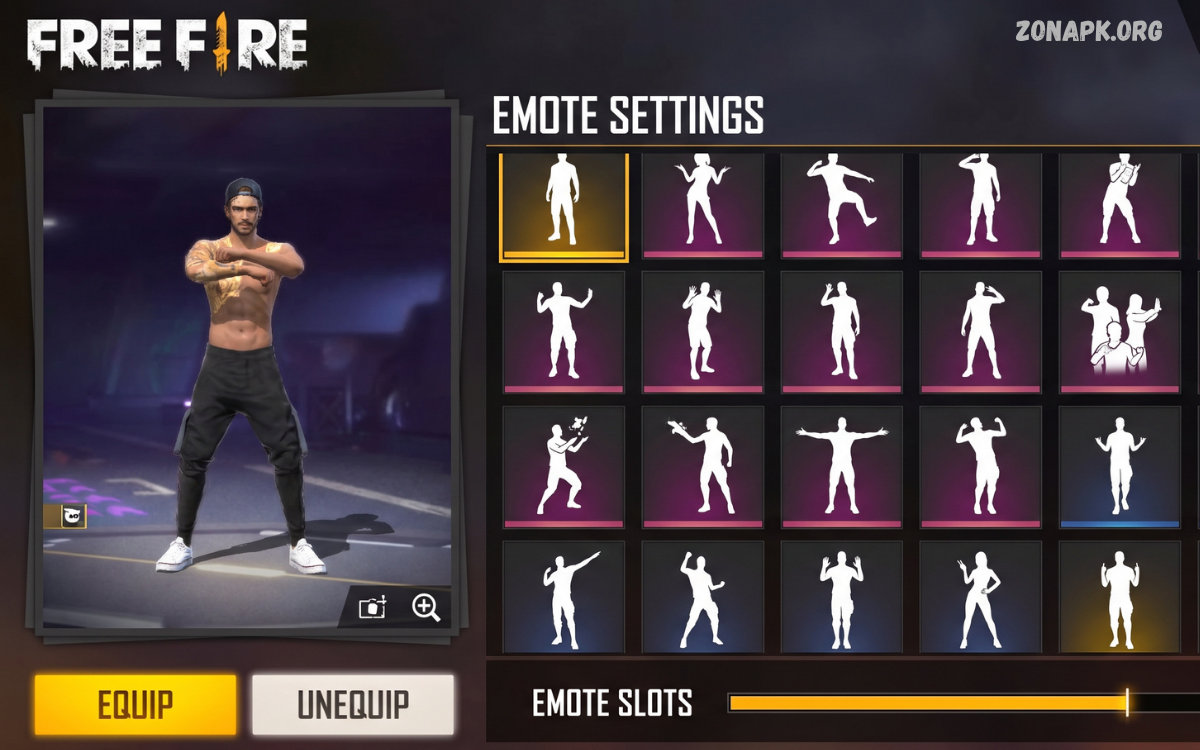
Free Fire emote settings help players manage, organize, and access emotes during matches. Emotes are more than simple animations because they allow players to communicate reactions, celebrate achievements, interact with teammates, and express personality without typing messages.
Understanding Free Fire emote settings also helps players create a comfortable control layout. Garena provides different customization options through the game interface, allowing players to select available emotes and arrange their preferred choices for quick access.
What Are Free Fire Emote Settings?
Free Fire emote settings refer to the controls and customization options used for managing emotes inside the game. Through these settings, players can choose which emotes appear in their active emote wheel or emote collection. Instead of searching through every unlocked animation during a match, players can place frequently used emotes in convenient slots for faster access.
The emote system is designed around quick interaction. Players can open the emote interface during a match and select an animation from their configured options. The exact interface can vary depending on the game version, device, and current Free Fire interface, but the main purpose remains the same: giving players an easy way to access selected emotes without unnecessary menu navigation.
Why Free Fire Emote Settings Matter
Good Free Fire emote settings can improve convenience during matches. Players often have numerous emotes collected from events, rewards, passes, collaborations, and other in-game activities. Keeping every emote active at once can make selection less convenient. Choosing a smaller group of favorite emotes creates a cleaner setup and makes commonly used animations easier to find.
Emote settings also provide a way to personalize gameplay. Some players prefer celebratory animations, while others enjoy humorous reactions or team-oriented emotes. Selecting emotes according to personal preferences makes the interface easier to understand and reduces the time required to find a specific animation during a match.
How to Open Free Fire Emote Settings
To access Free Fire emote settings, start the game and enter the main lobby. Look for the profile, collection, or customization area where character-related items and emotes are managed. Depending on the current interface, the location or name of the option may differ slightly after an update.
Open the emote section and review the available animations. You can usually identify unlocked emotes and select the ones you want to use. After choosing preferred animations, assign them to available slots if the interface provides slot customization. Save or confirm the configuration when required, then return to the lobby or start a match to test the setup.
How to Set Your Favorite Emotes
Start by reviewing your complete emote collection and identifying animations you use most often. Avoid filling every available slot with similar emotes. A balanced selection can include one celebration emote, one funny reaction, one greeting-style emote, and other animations that match your preferred gameplay style.
After selecting your favorites, place them into accessible slots. The goal should be quick recognition rather than simply adding the largest number of animations possible. If you frequently change emotes, periodically review the configuration and replace animations that you rarely use with newer favorites.
Best Free Fire Emote Settings for Beginners
Beginners should keep their Free Fire emote settings simple. Selecting a small group of familiar animations makes the emote interface easier to understand and prevents unnecessary searching during matches. New players can start with their favorite celebration, greeting, reaction, and humorous emotes.
As gameplay experience increases, the configuration can be adjusted according to personal habits. There is no universal emote arrangement that works perfectly for every player because preferences, device controls, and gameplay situations differ. The best setup is one that allows quick access without distracting from movement, combat, or other important actions.
Free Fire Emote Wheel Setup
The emote wheel is an important part of quick emote access. Instead of scrolling through a large collection, players can use configured positions to select preferred animations. A practical wheel setup should place frequently used emotes in positions that are easy to recognize.
Consider grouping emotes according to purpose. For example, greetings can occupy one section while celebrations and funny reactions occupy other positions. This creates a mental map that makes selection faster. After using the setup for several matches, players can identify which positions feel natural and adjust them accordingly.
How to Change Emotes in Free Fire
Changing emotes generally involves entering the emote customization area, selecting an existing slot, and replacing its animation with another available emote. Players can browse their collection and choose a different animation according to personal preference.
After making changes, test the new arrangement during a match or suitable game environment. Testing helps confirm that the selected emotes are placed where expected. If an animation feels difficult to access, return to the customization screen and move it to a more convenient slot.
Free Fire Emote Settings for Quick Access
Quick access is one of the main reasons to organize emote settings carefully. During a match, players have limited attention because movement, positioning, enemies, teammates, and the shrinking play zone can all require immediate focus. A complicated emote arrangement can become inconvenient when players simply want to trigger a quick reaction.
Keep the most frequently used emotes in easy-to-recognize positions. Avoid constantly changing their locations because muscle memory can make repeated actions faster. Once a comfortable configuration has been created, using the same arrangement consistently can make emote selection more predictable.
Free Fire Emote Settings and HUD Customization
Emote controls work alongside the game’s broader HUD customization. The HUD determines where different controls appear on the screen, while emote settings determine which animations are available through the emote interface. Keeping both systems organized can create a more comfortable control experience.
Players should avoid placing important controls in positions that make the screen difficult to navigate. When adjusting the HUD, consider visibility, screen size, touch accuracy, and personal comfort. Emotes should remain accessible without interfering with essential gameplay controls.
Emote Settings for Different Play Styles
Aggressive players may prefer quick celebration and reaction emotes that can be used after successful encounters. Their configuration can prioritize animations that are easy to identify and activate without spending much time navigating the interface.
Players who focus more on teamwork may prefer greetings, communication-style animations, and group-oriented emotes. Casual players can prioritize humorous animations, dances, and event-based designs. The flexibility of Free Fire emote settings means players can create a configuration that reflects how they normally play.
Free Fire Emote Settings for Team Matches
Team matches create additional opportunities to use emotes for communication and interaction. Players can select animations that help create a friendly atmosphere between teammates. Greetings, acknowledgments, celebrations, and humorous reactions can all add personality to team sessions.
However, emotes should not replace important gameplay communication when precise coordination is required. During competitive situations, players should focus on positioning, teamwork, and game objectives. Emotes work best during relaxed moments rather than situations requiring immediate attention.
Free Fire Emote Settings for Solo Players
Solo players can customize emote settings entirely around personal preferences. Without teammates to consider, there is no need to reserve slots for particular communication purposes. Players can select their favorite animations and organize them based on frequency of use.
A solo setup can also be changed regularly to keep the experience fresh. Players who collect many emotes can rotate different animations depending on events, seasons, outfits, or personal preferences. This makes the emote collection more useful instead of leaving most animations unused.
How to Organize a Large Emote Collection
Players who have collected many emotes may find organization especially useful. Start by separating frequently used animations from those rarely selected. Keep the most useful options active while leaving less-used animations in the broader collection.
Another useful approach is to organize emotes by purpose. Celebration animations can form one group, humorous animations another, and greetings or social reactions another. This mental categorization makes it easier to remember where specific animations are located.
Free Fire Emote Settings After Updates
Game updates can sometimes change menus, interfaces, controls, or customization layouts. After a major Free Fire update, players should review their emote configuration rather than assuming every option remains exactly where it was previously.
If an emote appears missing after an update, first check the collection and customization sections. It may be located under a different menu or interface category. Avoid assuming that an animation has been permanently removed simply because its previous position has changed.
Free Fire Emote Settings and New Emotes
New emotes can change how players organize their collection. When obtaining a new animation, test it before immediately replacing an existing favorite. Some event or limited-time emotes may have unique designs that make them more appealing for particular situations.
Instead of replacing frequently used animations every time a new emote becomes available, maintain a stable core configuration. Rotate one or two slots when you want to experiment. This preserves familiarity while still allowing you to enjoy newly unlocked content.
Common Free Fire Emote Settings Mistakes
One common mistake is filling active slots with animations that are rarely used. A large collection does not automatically create a better setup. Too many unnecessary choices can make selection slower and reduce the convenience of the emote wheel.
Another mistake is changing the arrangement too frequently. Constantly moving favorite emotes can prevent players from becoming familiar with their positions. Once you discover a comfortable setup, keep it consistent for several matches before making major changes.
Mistake: Ignoring the HUD
Players sometimes focus heavily on emote selection while ignoring the overall HUD. Emotes are only one part of the control system. If the HUD is crowded or poorly arranged, accessing emotes can become uncomfortable regardless of how well the collection is organized.
Review the entire screen layout when making changes. Important controls should remain easy to reach, while the emote interface should be accessible without causing accidental taps. A clean HUD can make the overall control experience more comfortable.
Mistake: Copying Another Player’s Settings
Popular players may share their Free Fire settings, but copying another person’s configuration does not guarantee the same experience. Different devices have different screen sizes, touch responses, aspect ratios, and control preferences.
Use other players’ setups as inspiration rather than treating them as fixed rules. Experiment with different arrangements and keep the configuration that feels natural on your own device. Personal comfort is more important than copying a popular setup exactly.
Can Emote Settings Improve Gameplay?
Free Fire emote settings do not directly increase weapon damage, movement speed, accuracy, or other combat statistics. Emotes are primarily designed for interaction, expression, and personalization rather than providing a competitive gameplay advantage.
However, organized settings can improve convenience. When players know where their preferred emotes are located, they spend less time navigating menus. This can make social interactions smoother and reduce unnecessary interface searching during appropriate moments.
Free Fire Emote Settings and Player Expression
Emotes provide a simple way to express personality without using voice or text communication. A player’s selected animations can communicate excitement, humor, celebration, greetings, or reactions during different situations.
This expressive element is one reason emotes remain popular. Players can create a recognizable style by combining preferred character outfits, animations, and other customization options. The result is a more personalized in-game identity without changing core gameplay mechanics.
Read Also: Free Fire Emote Slot: Complete Guide to Managing and Using Emotes
How to Build a Balanced Emote Setup
A balanced setup should contain different types of animations instead of multiple versions of the same reaction. For example, players can select a greeting, celebration, humorous reaction, and personal favorite. This gives the emote wheel variety without making it difficult to navigate.
Review the setup after several matches. Pay attention to which animations you actually use and which ones remain untouched. Replace unused options gradually rather than changing everything at once. This approach makes it easier to discover an efficient configuration.
Free Fire Emote Settings for Casual Players
Casual players can prioritize fun and personality when creating their emote configuration. There is no requirement to use a particular arrangement. Favorite dances, celebrations, funny reactions, and seasonal animations can all be included.
Because casual sessions are generally more relaxed, players can also experiment with different combinations. Changing emotes based on events or personal preferences can keep the customization experience interesting and give older animations a new opportunity to be used.
Free Fire Emote Settings for Competitive Players
Competitive players generally benefit from keeping their interface simple and predictable. Since attention should remain focused on gameplay, the emote configuration should not require unnecessary navigation.
A small selection of familiar emotes can be enough. Players should avoid making frequent changes immediately before important matches because unfamiliar control positions can create confusion. Stable settings support consistent interaction with the game interface.
Emote Settings on Different Devices
The ideal emote configuration can feel different depending on the device being used. A large-screen phone may provide more comfortable touch interaction than a smaller display, while different screen ratios can change how controls appear.
Players should therefore configure emotes on the device they use most often. If switching between devices, review the layout and test the controls. A setup that feels comfortable on one screen may not feel equally convenient on another.
Free Fire Emote Settings for Better Customization
Customization becomes more useful when every active slot has a purpose. Instead of selecting emotes randomly, think about the situations where you normally use them. This creates a more practical collection and makes each slot easier to remember.
Players can also coordinate emotes with character appearances and special events. While these choices do not affect combat performance, they can create a more consistent visual style and make the overall game experience more enjoyable.
How Often Should You Change Emote Settings?
There is no fixed schedule for changing emote settings. Players can modify them whenever they unlock a new favorite animation or become bored with their current selection. Frequent changes are perfectly acceptable for players who enjoy experimenting.
For players who value consistency, changing settings less often may be better. Keeping familiar positions allows quicker recognition. The ideal approach depends on whether you prefer stable controls or regularly updated customization.
Free Fire Emote Settings and Events
Free Fire frequently introduces special content through events and limited-time activities. New emotes may become available as part of these releases. When obtaining event-based animations, players can add them to their collection and decide whether they deserve a place in the active configuration.
Limited-time content can also be useful for creating temporary themes. For example, players may use event-related emotes during a particular celebration and later return to their standard setup. This provides variety without permanently changing familiar controls.
Tips for Better Free Fire Emote Management
Start with your most-used emotes and place them in familiar positions. Remove rarely used animations from active slots, categorize your collection mentally, and avoid unnecessary changes during important matches. These simple habits can make the emote system easier to manage.
Regularly reviewing the collection is also useful. New emotes can gradually make older configurations less relevant. A quick review every few weeks or after major content updates can help keep your active selection organized and enjoyable.
Are Free Fire Emote Settings the Same for Everyone?
No. Free Fire emote settings are highly dependent on personal preferences and available customization options. Players may have different collections, different devices, different HUD arrangements, and different reasons for using emotes.
A configuration that works well for one player may feel inconvenient for another. Instead of searching for a single perfect setup, focus on creating a layout that matches your own habits. Testing and gradual adjustment are the most reliable ways to find comfortable settings.
Frequently Asked Questions
How do I change Free Fire emote settings?
Open the game’s customization or emote section from the main interface, review your available animations, and assign preferred emotes to available slots. Menu names and locations can change with game updates, so use the current interface shown on your device.
How many emotes should I keep active?
Use the number of slots available in your current version and select only the animations you genuinely use. A smaller, organized selection is often easier to manage than filling every position with rarely used emotes.
Can emote settings improve accuracy?
No. Emote settings do not directly improve aiming accuracy, weapon performance, or character statistics. Their main purpose is customization, interaction, and convenient access to animations.
Should beginners copy professional players’ settings?
Beginners can study other players’ configurations for ideas, but copying them exactly is unnecessary. Device differences and personal preferences mean that a setup should ultimately be adjusted for the individual player.
Can I change my emotes whenever I want?
Generally, players can modify their available emote configuration through the game’s customization interface. The exact process can vary after updates, so check the current menu structure when making changes.
Conclusion
Free Fire emote settings provide an easy way to organize animations and personalize the gameplay experience. A good configuration does not need to be complicated. Selecting favorite emotes, placing them in familiar positions, and maintaining a clean setup can make interactions faster and more enjoyable.
The best Free Fire emote settings are ultimately the ones that match your personal preferences, device, and play style. Experiment with different arrangements, keep the animations you actually use, and review your configuration whenever new content becomes available. With a simple and organized setup, players can enjoy smoother emote access while keeping their attention focused on the match.

1 Comment
Pingback: Free Fire Emote Equip: Complete Guide to Equipping and Using Emotes - Zonapk