

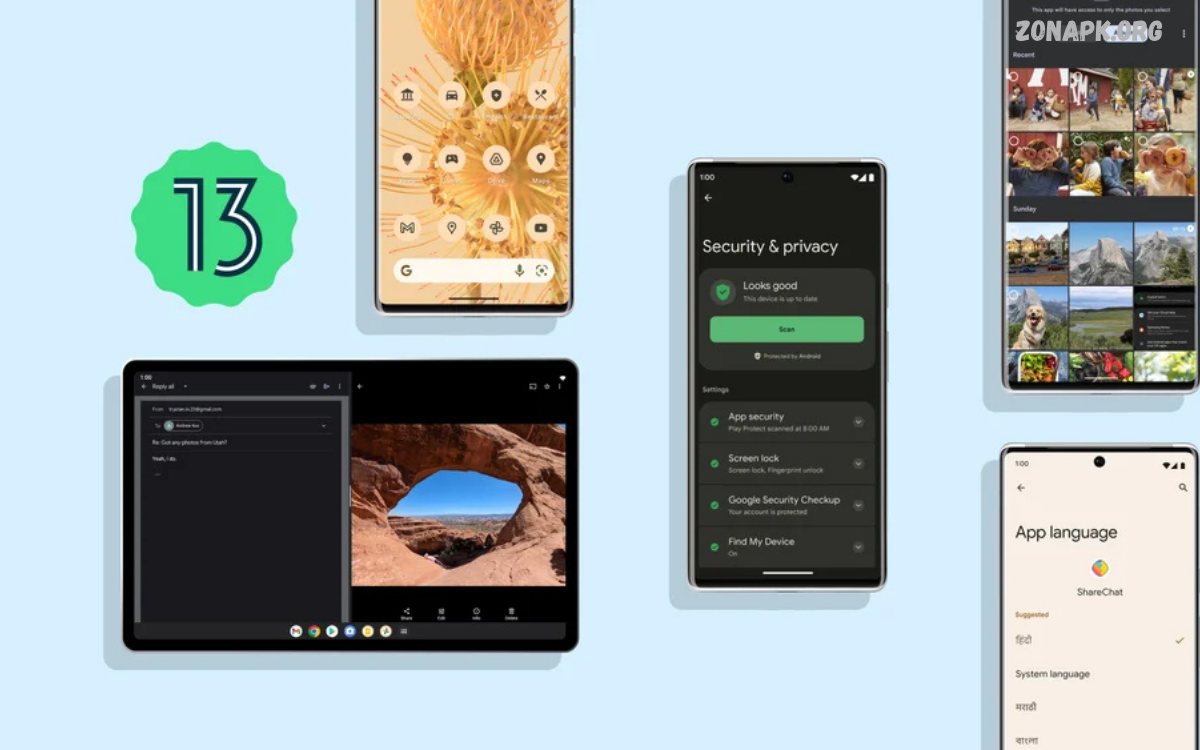
Android Features continue to evolve with every major Android release, bringing practical improvements to smartphones, tablets, foldable devices, and other connected products.
From advanced security controls to smarter notifications, Android Features help users manage daily tasks with greater flexibility. New software updates continue introducing tools designed to improve productivity, entertainment, communication, photography, and overall mobile usability.
What Are Android Features?
Android Features refer to the functions, tools, settings, and technologies available within the Android operating system. These capabilities allow users to customize interfaces, manage applications, protect personal information, communicate with other devices, and control smartphone behavior.
Google and Android device manufacturers regularly introduce new capabilities through operating system updates, security patches, and manufacturer-specific software. As a result, available Android Features can differ depending on the Android version, smartphone model, manufacturer interface, and hardware configuration.
Android Customization Features
Customization remains one of the most recognizable Android Features. Users can personalize wallpapers, widgets, app layouts, themes, notification settings, quick settings, lock-screen elements, and other interface components according to their preferences.
Modern Android versions provide more control over visual appearance and system behavior without requiring advanced technical knowledge. Depending on the device, users can also change icon styles, color palettes, display settings, fonts, navigation methods, and home-screen arrangements.
Android Privacy Features
Privacy has become a major part of modern Android development. Android provides permission controls that allow users to decide whether applications can access information such as location, camera, microphone, contacts, photos, and other sensitive resources.
Permission management can also help users understand application access and restrict unnecessary permissions. Privacy dashboards, permission indicators, automatic permission resets, and related controls provide additional visibility into how applications interact with personal information.
Android Security Features
Android security Features protect devices against unauthorized access, harmful applications, suspicious activity, and data exposure. Screen locks, biometric authentication, encryption, secure boot technologies, and security updates form important parts of Android’s security architecture.
Google Play Protect also helps scan applications for potentially harmful behavior. Security protections operate across different layers of the Android ecosystem, although exact capabilities vary according to device hardware, Android version, manufacturer software, and update availability.
Android Artificial Intelligence Features
Artificial intelligence has become increasingly important across Android smartphones. AI-powered tools can assist with photography, text processing, translation, voice interaction, search, productivity, image editing, and other everyday smartphone activities.
AI capabilities vary considerably between devices because many functions depend on processor hardware, cloud services, manufacturer software, and Android version. Newer smartphones may provide dedicated AI processing hardware that supports faster on-device operations and additional intelligent features.
Android Battery Management Features
Battery management Features help users understand and control smartphone power consumption. Android can monitor application activity, identify battery usage, restrict background activity, and provide power-saving options designed to extend battery life.
Adaptive battery technologies can prioritize applications according to usage patterns, while battery-saver modes can reduce background activity and certain system operations. Actual battery performance depends on display settings, network conditions, application behavior, processor efficiency, and battery capacity.
Android Performance Features
Android performance Features are designed to provide responsive application operation while managing available system resources. Modern Android versions include improvements involving memory management, background processes, application behavior, graphics performance, and system responsiveness.
Smartphone manufacturers can further optimize Android through their own software interfaces and hardware configurations. Performance therefore differs across devices, even when two smartphones use the same Android version, because processors, storage technologies, memory capacity, thermal systems, and software optimization vary.
Android Multitasking Features
Multitasking allows users to switch between applications and complete multiple tasks efficiently. Recent Android versions support features such as split-screen operation, picture-in-picture, application switching, floating interfaces, and specialized multitasking options on compatible devices.
Large-screen smartphones, tablets, and foldable devices can provide expanded multitasking capabilities. Users may watch content while communicating, compare information across applications, or maintain multiple workflows without repeatedly opening and closing applications.
Android Notification Features
Notifications provide real-time information about messages, application activity, reminders, system events, downloads, and other updates. Android allows users to control notification permissions, notification categories, sounds, vibration, lock-screen visibility, and priority behavior.
Notification controls help reduce unnecessary interruptions while keeping important information accessible. Users can often manage notification behavior individually for different applications, allowing communication tools, productivity applications, entertainment services, and other software to follow different notification preferences.
Android Quick Settings Features
Quick Settings provide convenient access to frequently used smartphone controls. Depending on the device, users can manage Wi-Fi, Bluetooth, mobile data, airplane mode, screen brightness, location, hotspot functionality, screen recording, and other system options.
The Quick Settings panel can often be customized by rearranging available tiles. This creates faster access to frequently used controls and reduces the need to navigate through multiple settings menus for common smartphone actions.
Android Accessibility Features
Accessibility Features make Android devices more usable for people with different visual, hearing, mobility, and cognitive requirements. Tools can include screen readers, magnification, larger text, hearing-related controls, interaction assistance, captions, and alternative navigation methods.
Android accessibility options can significantly improve interaction with digital content. Availability differs by Android version and device, but the overall platform provides a broad collection of settings designed to support more flexible smartphone interaction.
Android Camera Features
Camera Features have expanded significantly as smartphone hardware and computational photography have improved. Android phones can provide portrait photography, night photography, HDR processing, stabilization, high-resolution imaging, slow motion, panoramic photography, and AI-assisted image processing.
Camera capabilities depend heavily on the smartphone model rather than Android alone. Premium devices may combine multiple camera sensors with advanced processors and software algorithms, while entry-level devices generally provide a more limited camera feature set.
Android Display Features
Modern Android smartphones provide extensive display controls designed to improve viewing comfort and visual quality. Depending on hardware, users may have access to adaptive brightness, refresh-rate controls, dark mode, color settings, screen resolution options, and eye-comfort features.
High-refresh-rate displays can make scrolling and animations appear smoother, while adaptive brightness adjusts screen illumination according to surrounding conditions. Display quality ultimately depends on panel technology, resolution, refresh rate, brightness, color calibration, and device software.
Android Connectivity Features
Connectivity is another important area of Android functionality. Android devices can connect through Wi-Fi, Bluetooth, mobile networks, NFC, USB, hotspot functionality, and other wireless technologies supported by specific hardware.
Connectivity Features allow smartphones to communicate with headphones, watches, vehicles, computers, televisions, smart-home products, and other compatible devices. Supported standards vary by smartphone model, network provider, accessories, and regional availability.
Android Bluetooth Features
Bluetooth enables Android smartphones to communicate wirelessly with compatible accessories and devices. Users can connect wireless headphones, speakers, keyboards, controllers, watches, vehicles, and other Bluetooth-enabled products.
Modern Bluetooth standards can improve connection reliability, energy efficiency, audio performance, and device communication. Actual functionality depends on the Bluetooth version supported by both connected devices and the software features available on each platform.
Android Wi-Fi Features
Wi-Fi provides Android devices with wireless internet access and local network connectivity. Android supports modern Wi-Fi standards depending on device hardware, allowing compatible smartphones to achieve improved speed, stability, efficiency, and network performance.
Android also provides controls for managing saved networks, network preferences, private DNS, hotspot functionality, and related connectivity settings. Network performance depends on the router, internet service, Wi-Fi standard, environmental conditions, and smartphone hardware.
Android App Management Features
Android provides extensive application management capabilities through system settings and Google Play. Users can install, update, uninstall, disable, restrict, and manage applications according to available device options.
Application management also includes storage permissions, notification controls, battery settings, mobile-data access, default applications, and background activity controls. These settings help users maintain control over how installed applications operate on the device.
Android Storage Features
Storage management helps users monitor applications, photos, videos, documents, downloads, cached information, and other files. Android provides system tools for identifying storage usage and managing available space.
Modern Android versions also use improved application and file-access controls to strengthen privacy. Depending on the device, users may manage cloud backups, external storage, file-management applications, and manufacturer-specific storage tools.
Android File Management Features
File management tools allow users to locate, organize, move, copy, rename, share, and delete digital files. Android devices commonly provide access to documents, images, videos, downloads, audio files, and application-generated content.
File-management behavior can differ between Android versions and manufacturer interfaces. Modern Android also places greater emphasis on controlled application access to user files, helping reduce unnecessary access to personal information.
Android Sharing Features
Android sharing tools make it easier to send content between applications and devices. Users can share images, documents, links, videos, contacts, and other supported content through applications installed on their smartphones.
Nearby sharing technologies can also simplify transfers between compatible devices. Sharing performance and available options depend on device compatibility, connectivity, application support, operating system version, and account configuration.
Read Also: Android AI Features: Powerful AI Tools Transforming Android Smartphones
Android Backup Features
Backup functionality helps protect important information when users replace, reset, or lose a smartphone. Depending on configuration, Android backup services can preserve selected application data, device settings, contacts, messages, and other supported information.
Backup behavior varies by Android version, device manufacturer, application, account configuration, and available cloud-storage capacity. Users should review backup settings regularly to understand which information is being preserved and how it can be restored.
Android Digital Wellbeing Features
Digital Wellbeing provides tools for understanding and managing smartphone usage. Users can review application activity, screen time, notification frequency, and other usage information through supported Android settings.
Features such as app timers, focus controls, bedtime-related settings, and notification management can help users establish preferred usage patterns. Availability and naming can differ between Android releases and manufacturer interfaces.
Android Parental Control Features
Android provides parental-control capabilities that can help families manage application access, content settings, screen-time limits, and certain digital activities. Some controls operate through Google’s family-management ecosystem rather than the basic Android settings menu.
Parental controls can vary based on account configuration, child age, region, device type, and installed services. Families should review available settings carefully because controls may differ between applications and operating-system versions.
Android Voice Features
Voice functionality allows users to interact with smartphones using spoken commands, dictation, accessibility tools, and supported digital assistants. Voice input can simplify messaging, searching, navigation, reminders, and other everyday activities.
Speech recognition can process spoken language through device-based or cloud-based technologies, depending on the feature. Performance may vary according to language support, microphone quality, network connectivity, background noise, and available processing capabilities.
Android Translation Features
Android devices can provide translation tools through system applications, Google services, keyboards, cameras, and third-party applications. Translation can help users understand written text, communicate across languages, and process information from images.
Some translation capabilities can operate without continuous internet connectivity when language resources are downloaded. Availability, accuracy, supported languages, and offline functionality vary between applications, regions, Android versions, and device models.
Android Keyboard Features
The Android keyboard provides text input through typing, voice input, predictive suggestions, autocorrection, emoji, stickers, and other communication tools. Users can often customize languages, layouts, themes, and typing preferences.
Modern keyboard software can also provide contextual suggestions and intelligent writing assistance. Keyboard capabilities depend on the installed keyboard application, language, device configuration, and available software services.
Android Gaming Features
Android gaming Features support mobile games through modern graphics technologies, performance optimization, controller connectivity, high-refresh-rate displays, and gaming-focused software tools available on certain devices.
Some smartphones include dedicated gaming modes that manage notifications, performance profiles, touch sensitivity, recording, and network behavior. Gaming performance depends on processor capability, graphics hardware, thermal management, display technology, storage speed, and game optimization.
Android Foldable Device Features
Foldable smartphones have expanded Android’s approach to multitasking and adaptive interfaces. Android can support applications that adjust layouts according to different screen sizes, orientations, and device configurations.
Foldable devices can provide larger viewing areas while maintaining a compact form factor when closed. Features such as split-screen applications, flexible layouts, continuity between displays, and specialized manufacturer software can improve the experience on compatible devices.
Android Tablet Features
Android tablets provide a larger screen environment suitable for productivity, education, entertainment, creative applications, and multitasking. Modern Android versions include improvements for large-screen interfaces and applications that adapt to different display dimensions.
Tablet Features can include split-screen operation, multiple application windows, keyboard support, stylus compatibility, and desktop-style workflows on supported devices. Hardware capabilities vary significantly across tablet models and manufacturers.
Android Updates and New Features
Android updates regularly introduce new functionality, security improvements, privacy controls, performance changes, interface modifications, and developer capabilities. Major releases generally receive greater attention, while smaller updates can address security and stability concerns.
Not every smartphone receives identical features at the same time. Update availability depends on the device manufacturer, model, carrier, region, hardware requirements, and software-support policy, making Android experiences different across the wider device ecosystem.
Why Android Features Matter
Android Features give users control over how smartphones function, communicate, protect information, manage applications, and support everyday activities. The platform’s flexibility allows manufacturers to create different experiences while retaining a common Android foundation.
The wide range of available capabilities also makes Android suitable for different user requirements. Students, professionals, creators, gamers, families, and general smartphone users can select settings and applications that match their individual workflows.
How to Get the Most From Android Features
Users can get more value from Android by regularly reviewing system settings, updating applications, installing security updates, managing permissions, controlling notifications, and checking battery and storage usage. These basic practices can improve everyday device management.
Exploring accessibility, privacy, connectivity, customization, and productivity settings can also reveal useful capabilities that remain unnoticed during normal smartphone use. Because features differ between devices, checking the specific model’s software documentation can provide additional information.
Future Android Features
Future Android development is expected to continue emphasizing artificial intelligence, privacy, security, adaptive interfaces, connected devices, accessibility, and large-screen experiences. On-device processing may also become increasingly important as smartphone processors gain stronger AI capabilities.
Android’s future direction will continue to depend on collaboration among Google, device manufacturers, application developers, chipset companies, and network providers. New hardware categories and software technologies will likely create additional opportunities for Android Features across smartphones and connected devices.
Frequently Asked Questions
What Are the Most Important Android Features?
Important Android Features include privacy controls, security tools, customization options, multitasking, notifications, battery management, application management, accessibility, connectivity, and regular software updates. Exact functionality depends on the Android version and device model.
Do All Android Phones Have the Same Features?
No. Android phones can have different Features because manufacturers customize the operating system and use different hardware configurations. Processor capability, camera hardware, display technology, sensors, Android version, and manufacturer software can all affect available functionality.
How Can Android Features Improve Privacy?
Android privacy Features provide controls for application permissions, location access, camera access, microphone access, photos, contacts, and other sensitive resources. Users can review permissions and restrict access when appropriate.
How Do Android Features Improve Security?
Android security Features combine application scanning, system protections, authentication, encryption, secure software processes, and security updates. Google Play Protect can help identify potentially harmful applications.
Can Android Features Save Battery?
Yes. Android includes battery-management tools designed to reduce unnecessary background activity and improve power efficiency. Battery Saver and adaptive battery functions can help manage power consumption on supported devices.
Are Android Features Available Offline?
Some Android Features work without an internet connection, including many system settings, camera functions, file-management tools, accessibility options, and selected downloaded resources. Other functions depend on online services.
How Often Do Android Features Change?
Android Features can change through major Android releases, smaller system updates, security updates, application updates, and manufacturer software releases. New functions may appear gradually across different devices.
Can Android Features Be Customized?
Many Android Features can be customized through system settings. Users can adjust wallpapers, widgets, notifications, permissions, display options, navigation methods, sound settings, accessibility controls, and other preferences.
Conclusion
Android features offer a broad collection of tools for customization, privacy, security, performance, artificial intelligence, communication, entertainment, accessibility, and productivity.
As Android continues developing, new hardware and software technologies will expand what smartphones can accomplish.

1 Comment
Pingback: AI Technology: How Artificial Intelligence Is Transforming the Digital World - Zonapk